
You have decided to move to a new system and someone has handed you a list: branches, customers, item master, open orders. The list usually comes from finance or from a consultant, and the person asked to fill it in usually sits in the warehouse. The two sides use the same words without meaning the same thing. To finance an item record is a row; to the warehouse it is a box on a shelf. Almost every mistake that surfaces on day one of a cutover comes out of that gap in translation.
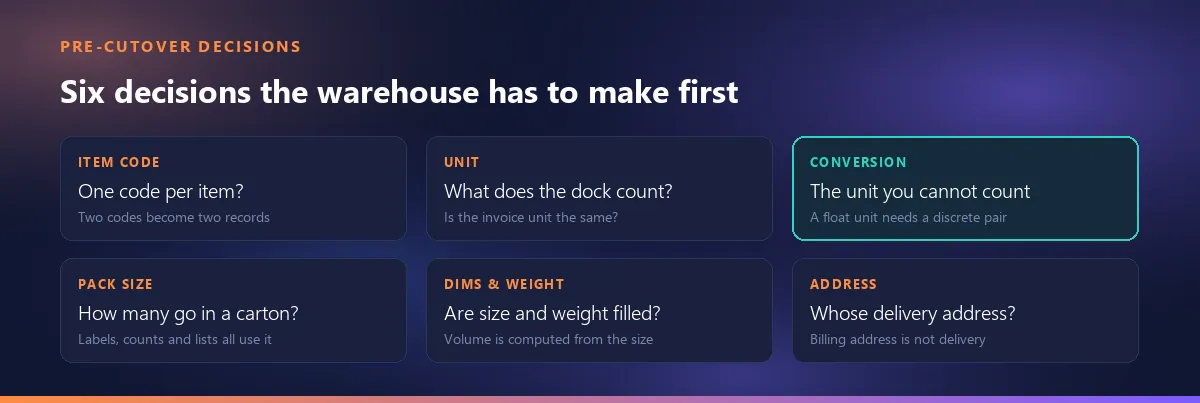
The argument of this article fits in one sentence: the migration list comes from accounting, but the right answer to every line on it lives in the warehouse. Whether an item code is genuinely unique, what a unit of measure actually counts and how many pieces go into a carton are decisions only the person on the dock can make. That is why data cleaning is not a spreadsheet job but a warehouse job. Below we break the preparation into nine decisions and then plan the cutover itself.
The list comes from accounting, the answers come from the warehouse
Whichever system you are moving to, the list you are handed looks much the same: company and branch details, customer records, the item master, open orders, and "opening balances". Most of what you will find written on this subject repeats exactly that list and stops there. Where it stops is where the trouble starts, because each line on the list hides a question that somebody has to answer physically.
Take one example. "Prepare the item master" is, on paper, a form-filling exercise. In the warehouse it means something else: which row in the system corresponds to the thing on this shelf, does that row's unit match what we actually count here, and is the same product also recorded under a second code? Finance cannot know any of this; finance holds codes and amounts. So the most productive first move in a cutover is not filling the list in — it is moving the list to the right person.
There is a second fact: a cutover is the only moment when these questions can be asked in bulk. Once the system is live, nobody opens four hundred records one by one to fill in dimensions; the daily work always wins. The sheet you prepare now becomes the source of the documents you will read for years. And the spreadsheet itself is not the enemy here — as a transport format for a migration it is exactly the right tool. Where it runs out is when it is asked to run the operation, which we argued separately: where the spreadsheet runs out.
Two codes for one item means the migration splits it in two
A duplicate item record can live undetected in an old system for years, for a simple reason: both codes work. One was opened by purchasing, the other by sales; one carries the importer's code, the other your internal one. Documents come out of both and both look right. A migration breaks that peace, because in the new system the two records are born as two separate products with no link between them.
Searching for duplicates by name similarity does not work — the same product sits under two different names, while genuinely different products sit under nearly identical ones. What works is the physical triple: dimensions, weight and pack size. Two records that agree on all three are probably the same thing whatever they are called; two records that disagree are different things even if the names match. That is why the sweep happens in the warehouse: the decision belongs to the person holding the box, not the person who opened the record.
The second common pattern is the hollow variant of an old code: a record was opened for a product, its dimensions and weight were never filled in, one or two documents went through it and it was forgotten. These are the most dangerous records at migration time, precisely because being empty they are caught by no sweep at all. The only question worth asking is: does this record still mean anything? If it does not, it is not carried over — a cutover is also the one chance to leave dead records behind. If it does, the people who order and ship that product decide together which record survives; this is not a technical operation but a question of ownership.
Two topics are deliberately left out here because each belongs to its own article. The form of the code — how many digits, leading zeros, characters that look like one another — is code scheme design, and its rules live elsewhere: the rules for designing a code scheme. Whether that code goes onto a barcode at all is a different decision entirely, and it does not have to be the same string as your item code: which number goes on the barcode is a separate decision.
If you must change a code, where the old one goes
Changing a code during a migration is sometimes unavoidable: two records merge, or the old scheme carries a character the new system will not accept. The cost of changing is usually overlooked. The moment the old code disappears, every past document printed with it becomes unreadable. Pick up a delivery note from a year ago and you cannot look up the code on it — the document turns into history.
The fix is not complicated: keep the old code alive in a field. Having it appear inside the product name, the model field or a description field in the new system is enough — it only has to be searchable, it does not need a field of its own. Doing this during the migration takes a minute; doing it afterwards is close to impossible, because by then nobody can find the sheet that remembers the mapping. Write the rule down: keep the table showing which old code became which new code, after the cutover too. It is the file you will need most and lose first.
Unit of measure: what the dock counts against what the invoice says
"Should I write kilograms or pieces?" eats more preparation time than any other question, and it is usually asked in the wrong frame. The right frame is this: units come in two kinds. Discrete units describe countable wholes — piece, carton, pallet, pair. Continuous (fractional) units describe measured quantities: kilogram, metre, cubic metre, litre. The difference is not academic but entirely practical: a continuous unit on its own is not enough to count with.
Think of a product sold by weight. The invoice says kilograms, correctly. But nobody counts kilograms on a loading dock; nobody says "I loaded twenty-three point four kilograms". A dock counts boxes. Which means that item record has to carry two units at once: the fractional unit sales uses and the discrete unit the warehouse uses — plus the conversion between them. Without that trio the record is not valid, and even where it looks valid the count will not add up on the first shipment. Sheet stock has the same split: sheets are bought by the piece and consumed by area, and how much of the gap is waste and how much is an offcut back on the rack is a separate calculation — see whether offcuts count as waste.
In our own application this is coded not as advice but as a hard rule: on item import, if the unit is a fractional one, the second unit and the conversion rate must be present and the second unit must be a discrete one; otherwise the row is not imported. The rule looks harsh, and the harshness is deliberate — a record opened with a fractional unit alone looks perfectly fine right up until the first carton label is printed from it.
Practical advice: go through the unit column of your export line by line, because what you will find there is often not a unit at all but a word somebody typed one day. "Pc", "pcs", "PCS", "piece", "each", "ea" may all mean the same thing to a human and are six separate values to a system. Consolidating them is half a day's work now and close to impossible after go-live.
The unit is a coded field, not free text
There is a documented reason to take the unit column this seriously. In electronic document formats the unit next to a quantity is not free text but a code drawn from a published list; national tax administrations publish which list applies and which values are valid for them. The consequence is the same everywhere: a unit that exists only as a word someone typed cannot be turned into a code, and the document layer cannot be produced from it.
The consequence is this: if one item record says "pc", another "PCS" and a third "pieces", all three have to resolve to the same code, and sooner or later somebody will do that resolution. If that somebody is you, it happens during the migration; if not, it happens years later when a document cannot be generated. In our application the unit name can be written in any of the three interface languages and is resolved to a canonical code; a row carrying a unit that cannot be resolved is skipped rather than imported — and there is a unit reference screen showing which codes are accepted and marking each one as continuous or discrete.
There is a step beyond this that migrations often skip: which official list these codes land on once they reach a document. The unit next to the quantity and the kind of package the goods travel in are not the same field on a document — which unit maps to which code.
Pack size: one number, three places where it breaks
The mandatory field that draws the most objections in a migration template is usually pack size. "The product has a price, a name and a code — why do you need to know how many fit in a carton right now?" Because that number is not used in one place but in three, and all three fail quietly.
First, the label: how many labels get printed follows from the relationship between package count and pack size. Break that relationship and you are left either with spare labels or with unlabelled cartons. Second, the loading count: if you load by scanning, the expected number of scans comes from the same relationship; get it wrong and loading either says "done" too early or never completes. Third, the packing list: the agreement between quantity and carton count rests on exactly this number being right. One wrong cell propagates into three documents at once and wears a different disguise in each.
The practical rule that follows: do not estimate pack size. Open a box and count. It is the dullest and highest-return task in the whole preparation. Which fields end up on the label that carries this same number is covered separately: which fields belong on a carton label.
Blank dimension and weight fields never get filled in later
Width, length, height and net/gross weight are almost always optional in a migration template — and for exactly that reason they are almost always left empty. The cost does not show up immediately; it shows up a few months in. Volume is a value computed from dimensions; no dimensions, no volume. Without volume there is no load plan, no way to sanity-check a freight quote, and no way to estimate how many pallets go into a container.
Weight is more clear-cut: net and gross weight are asked for on export documents, and nobody ever gets round to reopening hundreds of records at that moment. What happens in practice is that the weight gets typed by hand while the document is being prepared — every time again, every time slightly differently. Then two documents show two different weights and nobody knows which one is right.
A cutover is the one moment when these fields can be filled in bulk, because you are already working row by row on a sheet. Measuring a box takes half a minute; entering the same measurements one at a time after go-live is a task that never starts. Write the dimension unit alongside — a dimension column that does not say whether it is centimetres or millimetres is more dangerous than an empty one, because it looks filled in.
These fields do not stop being useful once the documents are printed: dimensions and weight also drive where an item can live.
Customers and branches: an address is a delivery point, not a string
Customer records are usually assumed to be the easy part of a migration, because finance keeps them tidy already. But what finance keeps tidy is the billing address — the address of the tax number, the legal name and the payment. What the warehouse needs is the delivery address, and for most customers the two are not the same. You invoice a head office and deliver to a factory; you invoice a retail chain and drop at five separate stores.
Filling city and region fields from a consistent list rather than free text during the migration pays off later too: when you want to read sales region by region, the data is ready. The question at that point is whether the map should show totals or a rate per customer or per head: per capita or total on a sales map.
The same split applies to the telephone number. The number on a customer record is usually the finance department's; the person who actually needs calling on the day of delivery is whoever will unload the truck. A migration is a good opportunity to separate the two — write down once which field serves whom, and for years afterwards everybody calls the right number.
A terminology warning as well: in many systems a branch and a warehouse are not the same object. In our application a branch is an organisational unit of your own company — not a bin or a rack location. Mixing the two while filling in a migration template is among the most laborious mistakes to undo later, because records opened under the wrong concept spread into documents over time. Addressing the internal locations of your own warehouse is a separate design job altogether: warehouse bin location addressing.
Load order: which data goes in before which
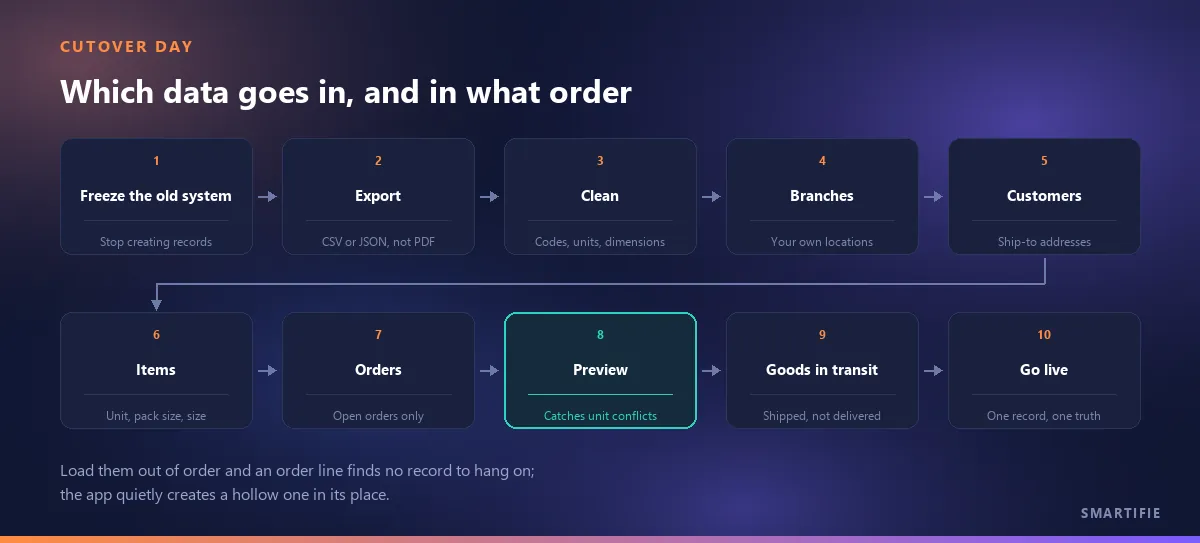
Once the files are ready one question remains, and it is usually asked last: which one do I load first? The order is not arbitrary, because the records depend on one another. The right order is branches → customers → items → orders. The reason is simple: an order line hangs off a customer, an item and a branch; if those three do not exist yet, there is nothing for it to hang on.
One point needs an honest correction here, because the familiar warning that "loading out of order makes rows disappear silently" is not true of our application — and the real behaviour is in fact sneakier. When the order import meets a customer or item code that does not exist, the row is not dropped: the app creates the record itself and shows you a warning. What it creates is hollow — the name is the code, the unit is the default, pack size is one, no dimensions, no weight. For a branch code that does not exist it warns you and takes you to the branch entry screen instead.
Why is that worse? Because a dropped row gets noticed, and a hollow record does not. Look at the item list in the new system and the records are all there, the count is right and everything looks fine. The only thing that is not fine is that none of those records carries a dimension, a weight or a real pack size — and that does not surface until the first label is printed. Loading in the right order means those hollow records are never born.
Look at the message the import ends with, too: our application reports how many records were imported and how many were skipped. A limit has to be stated plainly here: it does not list which row was skipped and why, only the total. So if the skipped count is above zero, going back through the file is your job. Watch for it deliberately; a non-zero skipped count is not a detail to skim past.
Why the preview comes before the save
Order import has a preview step before saving, and that step has one real job: to flag the rows where the same item code arrives with two different units inside the file. This is the last point at which a unit-of-measure inconsistency can be caught. Once saved, two units become two realities, and which one is correct is no longer remembered by the file but by a person.
There is a limit here too, and it should be said: this preview exists only on the order import. The item import has no preview — the file is processed directly, rows that break the rules are skipped, and what you see at the end is a number. Which is exactly why the item file is the one to read most carefully before it goes anywhere near the system.
Cutover day: what stops, and what happens to goods in transit
The most postponed part of a migration is the moment of the cut itself. Everyone talks about preparing data; nobody writes down the answer to "at what hour do we stop creating records in the old system". Yet that single sentence prevents the most expensive mistake of a cutover: the same document being opened in both systems.
Writing down the cut is not a matter of naming one date; it has to be written per document type. When do you start taking orders in the new system? From what date onwards do you issue dispatch documents there? Invoices? The three do not have to fall on the same day and usually do not. When it is not written down, everyone acts on their own guess, and a week later you find half-finished documents in both systems.
The item most often forgotten is goods in transit: shipments that have left but not yet been delivered. In the old system they are gone; in the new one they never existed. When they arrive there is no record to receive them against, and nobody thinks about this before the cut. The rule should be: every shipment in transit at the moment of the cut must exist as an open record in whichever system will close it. You decide which system that is — but it has to be decided.
Running in parallel — keeping both systems going for a while — is often recommended and genuinely lowers risk, but the price is entering every document twice. We will not put a number on how long it should last, because the only things that decide that are your document volume and the stamina of the person doing the double entry. What can be said is that the exit condition for parallel running has to be written at the start. "Let's use both for a while" tends to last months precisely because it has no exit condition, and it leaves incomplete data in both systems.
Before you switch the old system off: take the data with you
Once the new system is running, keeping a subscription or a maintenance contract alive on the old one looks pointless — and it is usually the first line to be cut. Before switching it off there is one question to answer: if I need that data again, where do I look?
If the answer is "we printed the reports to PDF", that is not enough. A pile of PDFs is not an archive: you cannot search inside it, compare two records or recompute a total. Exporting the data in a machine-readable form — CSV or JSON — takes less effort than printing PDFs and gives you a real archive in return. Our own application offers both formats; but the point is not which software you use, it is not skipping this step before the lights go out.
There is an obligation side to this as well. Commercial and financial records have to stay readable for whatever retention period applies to you — and "readable" does not mean a database file locked inside a program nobody can start any more. Retention periods and their scope differ by country and by document type, so take them from your own accountant rather than from an article; a half-remembered period is riskier than no assumption at all.
One last warning: taking the data is not the same as being able to read it. Open the export once before the shutdown date and look up a record inside it. If it will not open, or the column headings mean nothing, what you are holding is a file and not an archive.
The same principle works in reverse: when bringing data in, watch for the overwrite risk. Our own transfer engine is conservative about this — if a record with the same number or code already exists at the target it does not overwrite it, it skips it. That stops an accidentally re-run transfer from corrupting data; it also defeats any expectation that "I transferred it, so it is updated". Whichever software you use, find out which behaviour applies before the first run.
What we do on this side, and what we do not
Rather than closing with a product pitch we want to close with a boundary, because the most expensive mistake in migration planning is starting out with the wrong expectation. Smartifie Logistic is not an ERP and does not aim to replace one; it is an application that sits on the shipping side.
What we do. Four screens — items, customers, orders and branches — offer a downloadable Excel template and an import; on the item record the code, the pack size and the unit are mandatory; where a fractional unit is used the second unit and the conversion rate become mandatory too; volume is not typed but computed from the dimensions you enter; the order import shows a preview before saving and flags rows where one item code arrives with two different units; and you can take your data back out as CSV or JSON.
What we do not do — and we would rather list it plainly. The application does not hold stock balances or on-hand quantities; there is no such thing as an "opening stock" record in it. There is no stock-count module. There is no lot, batch, serial number or expiry date tracking. There is no accounting — a "customer" here is a customer record, not an account; there are no balances, open invoices or charts of accounts. We have no connector to any ERP; data moves through the Excel template, plus an option to transfer into your own database. And there is no cleanup wizard that finds or merges duplicate records; the sweep described in this article is done by you, not by the software.
We list this out of practicality rather than modesty: if any of those items is a requirement for you, the answer lies elsewhere and you need to know that before the cutover, not after. By the same token, which side of the migration we stand on is clear: we exist so that the order, the dispatch order, the loading, the carton label and the delivery document all come out of one record. To close on the opening argument — the migration list comes from accounting, but the answer to every line on it lives in the warehouse. Do the preparation there and fewer things break, whichever system you are moving to.