
Almost everyone starts tracking shipments in a spreadsheet. That is not a bad decision: it is fast, free, and nobody needs training. The problem is not that the file one day breaks; it is that the gaps you cannot see at a few packages a day quietly turn into errors as volume grows.
Below are the seven bottlenecks we see most often in small and mid-sized manufacturers, plus three concrete thresholds that tell you it is time to move on.
1. Why spreadsheets are everywhere
Because it genuinely is a good tool. You do not need approval to add a column, you write the formula yourself, and you can email the file to anyone. While shipping volume is low, that flexibility beats everything. The point of this article is not to dismiss spreadsheets, but to show where they start costing you money.
Where spreadsheets have no rival is analysis: pivoting sales by region, computing a rate, getting a table ready for a map. Even there the real mistake is not in the formula but in which number gets picked; see sales map by region: per capita or total?.
2. A spreadsheet will not tell you a carton was loaded twice
A row says "3 cartons". In the warehouse, one of those three is accidentally loaded onto the vehicle a second time. The spreadsheet cannot notice, because it does not know the carton itself — it only holds a number. The error usually surfaces months later when a customer reports a short delivery, and by then proving what went on which vehicle is nearly impossible.
The fix is not a formula but giving every package its own identity. When a unique barcode is generated per package, a second scan is rejected immediately. What the person at the dock should do once that scan is rejected is a separate subject: what to do when a scan is rejected.
3. Building labels by hand multiplies mistakes by hand
Labels are usually copied into a separate Word or spreadsheet template. If a row shifts during copy-paste, the wrong address ends up on the wrong carton. Worse, the mistake rarely stays in one label: the whole batch printed from that template is affected. This is the most expensive class of shipping error, because the goods physically go to the wrong place.
Before fixing the template, there is a prior question: what information should that label actually carry? what information a carton label should carry is the subject of a separate post.
4. When two people open the same file
Warehouse and dispatch cannot work in the same sheet. The file on the shared drive gets locked, copied, "last save wins", and someone's entry quietly disappears. Even cloud versions that allow simultaneous editing have no rule preventing two people from changing the package count on the same row in different ways.
5. Who changed what, and when?
In a dispute, the thing you need most is an audit trail. When a cell changes in a spreadsheet, all that remains is the new value; who changed it, when, and from what is gone. There are no role-based permissions either: anyone who can open the file can change anything in it.
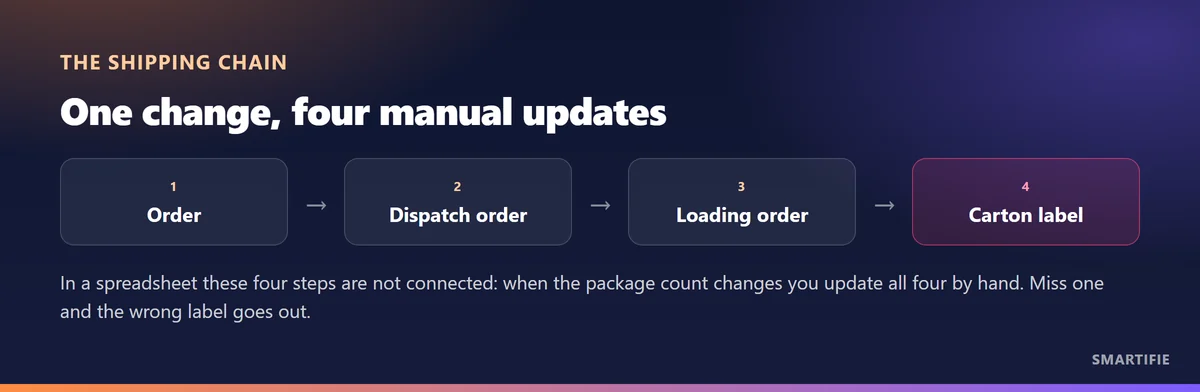
6. Change the package count and the chain breaks
Shipping is not one table; it is four connected steps. In a spreadsheet those steps live in separate tabs, sometimes separate files. When the customer updates the order or the warehouse corrects the package count, you have to update all four by hand.
7. Proof of delivery does not live in the sheet
The signed delivery note is usually scanned into a folder; its only link to the sheet is the order number in the filename. When a delivery is disputed, finding the evidence takes hours rather than minutes. Keeping the record and the document apart is the most commonly ignored risk in shipping.
For the document itself - how a delivery note is issued - we wrote a separate post on which fields are filled in and how many copies travel.
The same problem applies to loading photos: a shot dropped into a folder is tied to the sheet by nothing but its filename. how to keep a usable photo archive is covered in a separate article.
8. When should you switch? Three concrete thresholds
A vague answer like "when you grow" is useless. The three thresholds we see in the field are quite clear; if one of them has happened, the spreadsheet is already costing you money.
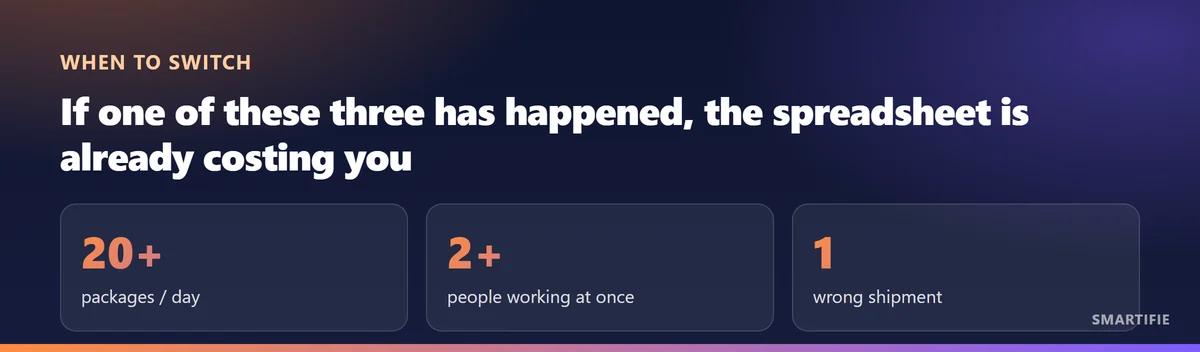
If you are under 20 packages a day and one person does the work, staying in a spreadsheet may be reasonable. But the moment a second user is added, the "last save wins" problem begins; and the first wrong shipment usually costs more than a year of software.
If one of those thresholds has already happened, the next step is not choosing software but preparing the data: once you decide to move, prepare the data first.
What does a connected flow look like?
Smartifie Logistic keeps those four steps in a single flow: the order, dispatch order, loading order and carton label all hang off the same record. Every package gets a unique barcode, a second scan of the same package is rejected during loading, labels print as PDF, and permissions are separated by role. You do not need to replace your existing ERP.
It runs on Windows, on Android (APK) and in a web browser; the interface is mobile-friendly, so you can use it from a phone on the warehouse floor.
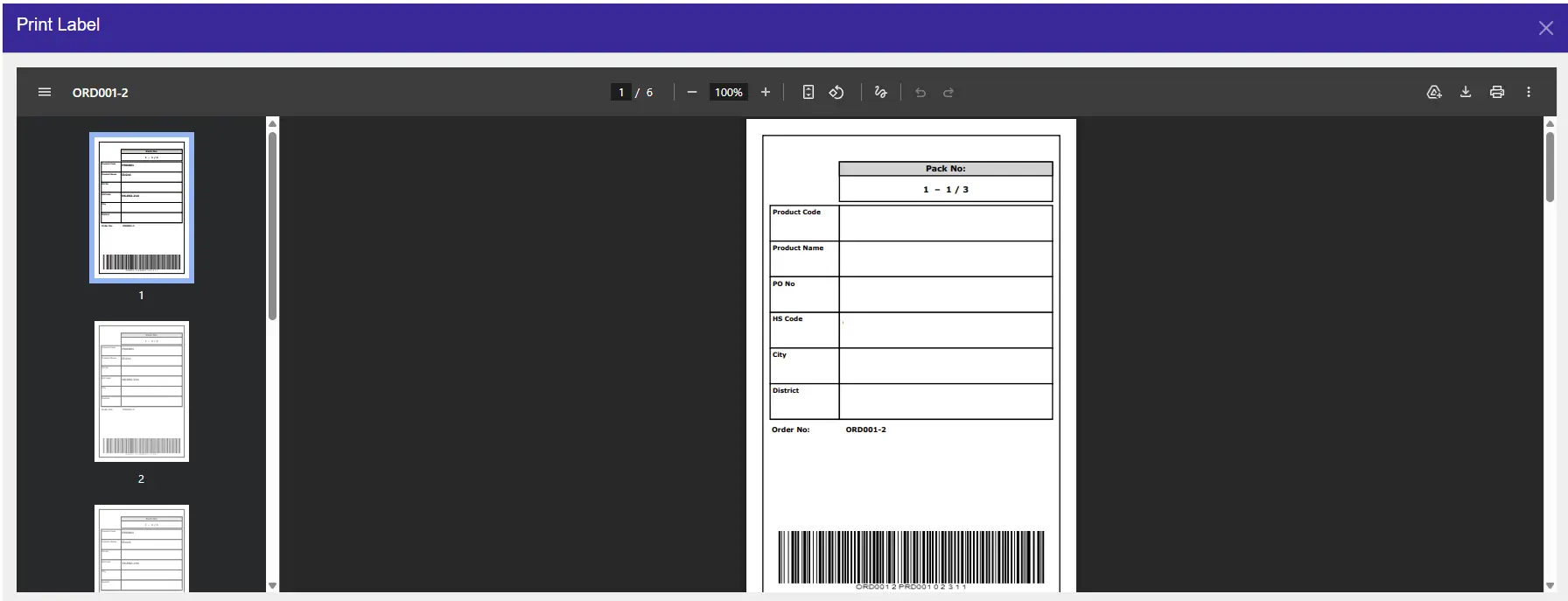
For a step-by-step walkthrough of the label printing flow, see How to Print Shipping Labels.
One step upstream, the order in which goods come off the shelf is also run from the same spreadsheet in most businesses. That step has a document of its own: picking list — which fields it carries and how it is produced is covered in a separate article.
If you want to get the document that travels with the shipment right, see How to Prepare a Packing List for the required fields and the common mistakes.