
A shipment that left months ago comes back as a phone call: a pallet was missing, or the cartons arrived crushed. Everyone in the warehouse remembers that day, and remembering changes nothing. Somebody's phone still holds the photos from that morning - and more often than not those photos change nothing either. This article is about the conditions under which a loading photo actually carries weight: which shots to take, why the timestamp inside the file is not the timestamp that matters, what the photo has to be attached to, how long the archive has to survive and what changes the moment a person walks into the frame. The short version: what makes a photo proof is not the camera, it is the record the photo hangs on.
What a photo proves, and what it does not
A photo shows exactly one thing: what was inside the frame. There are three things it does not show, and a dispute always lands on those three - which shipment the photo belongs to, when it was taken and who took it. Months later the other side will not argue with the pallet in the picture; they will say "that is not our pallet", "that looks like a different day", "we have no idea who took this". None of those three can be answered with the image itself, because the image says nothing about any of them.
That is the spine of this article: what makes a photo proof is not the image but the record it is attached to. A photo does not replace a document either; it completes one. And throughout this article you are on the sending side - the goods are leaving your dock. For the other end of the same event, that is what the receiving side does at handover, we wrote a separate article.
Which shots do you take before the truck leaves?
Photographing a load is not a reflex, it is a short list. Six shots are enough, and each of the six exists for a reason; a shot with no reason behind it fills the archive without adding anything to it.

- The whole pallet or carton group. Shoot it from an angle where the units can be counted. Months later this is the only visual answer to "how many cartons left the building".
- The label, close enough to read. Let the image itself say which shipment this is. A pallet whose label is unreadable in every frame cannot later be shown to be your pallet.
- The sealed packaging: wrap, tape, corner protection. This is the only frame that shows the packaging was intact on departure, and that is precisely the first question in any damage discussion.
- The load on the vehicle. Stacking and securing should be visible. Any argument about a load that shifted on the road starts with how it was placed in the vehicle.
- The last frame before the doors close. This is the image closest to the moment responsibility changes hands. Anything shot after it is no longer goods in your keeping.
- The exception shot. A scuff, a dent, a missing piece, a re-taped carton - the only way to say "it was already like that when it left" is to have photographed it while it was leaving.
The rule fits in a line: wide to close, and every frame carries one reference. The reference is whatever tells you which shipment the frame belongs to - a label, an order number, a countable arrangement. A frame with no reference in it is a nice photograph and nothing more.
The work these frames are showing, that is building and securing the pallet properly, is a subject of its own: where loading and stowage responsibility sits, as a rule, once damage appears.
Three shots that do not help
- A close-up of damage on its own. The dent fills the frame, but no label and no pallet are visible. When the other side asks "which carton is that?" you have no answer.
- A wide shot of the whole warehouse. Everything is in it and nothing is legible. That frame shows atmosphere, not a shipment.
- A frame taken after the vehicle has gone. A photo shot once loading is over shows goods that are no longer in your hands; the moment it describes has already passed.
Why the timestamp inside the file is not the timestamp that counts
The most common reassurance at the dock is "the phone records the date anyway". It does - but where it records it is inside the file. Those embedded fields are called EXIF, and they travel with the file. Everything that travels with a file shares one property: anybody who can touch the file can change it. Editing an EXIF date takes seconds, and there are free tools that do exactly that.
The same logic applies to date stamps burned onto the image: the stamp is written by the very app that took the photo, not by an independent witness. What makes a date strong is where it sits - outside the photo, in a place the person who uploaded it cannot edit. In practice that is the record's own "uploaded by, uploaded at" line. That line does not live on your phone; it lives in the system's ledger. Which is the whole point: a phone gallery does not produce evidence, a record does.
None of this should be overstated: deciding what a photo is worth in a dispute is not the job of a blog post, and every case turns on its own facts. The claim here is more modest - a defence resting on the date inside the file is easy to argue with, and a defence resting on the date inside the record is not. Confirm your own position with your legal adviser.
What do you attach the photo to: a filename or a record?
In most companies the photos go into a folder and the link is made in the filename: customer, date, maybe an order number. On day one it works perfectly. By month six it does not: the person who names the files is on holiday, the same order was split across two shipments, the phone was replaced, a folder was moved by accident. The problem is not a lack of discipline; it is that the link lives in a filename.
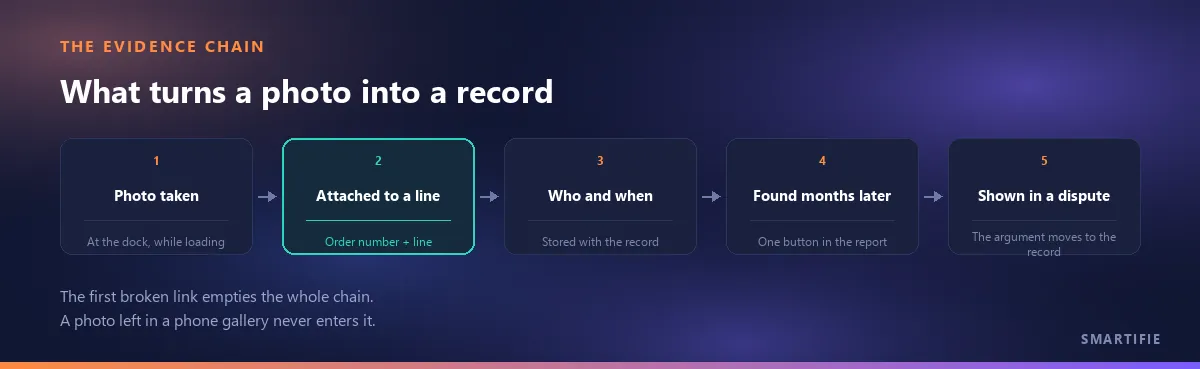
The link has to be made at line level: not to the shipment as a whole but to the specific line of the specific item. For a photo to carry weight, four fields have to be filled at once: which shipment, which line, who, when. When all four live inside the record, searching for photos stops being a task - whoever opens the record already sees the photo. The same record also holds the trace of the scanning done during loading; verifying a load by scanning is a subject of its own.
One boundary is worth stating plainly: the photo does not replace the document. The paperwork that travels with the shipment follows its own rules and the photo only completes it - how a delivery note is issued covers the document itself.
Who takes the photo, and when?
The photo is taken by the person who physically closes the load. Somebody walking down from the office half an hour later cannot photograph a moment that has already gone; that moment existed at the dock, while the loading was happening. The timing fits in one line: before responsibility changes hands. Every frame shot after the vehicle has left the gate is open to the objection that it was taken while the goods were not with them - and that objection is fair.
The operational rule is this: the task belongs to the step, not to a person. The day you say "Ahmet takes the photos", the shipment that goes out while Ahmet is on leave has no photos. The correct version is "whoever closes the load takes the photo" - and since the record already stores who uploaded it, responsibility names itself. This is not a new job on somebody's list; it is part of the step that closes a load.
How long does the photo archive have to survive?
There is no retention period written for a photo as such. What sets the clock is the document the photo supports. Commercial records have statutory retention periods in every country, and in practice those periods decide how long your photo archive has to stay reachable: a photo that supports a difference is worth nothing if it disappears before the document it belongs to does. The exact number of years, and which rule applies to you, is a question for your accountant.
There is a second half to this that matters more on the floor: keeping the images somewhere is not the same as being able to produce them. The practical test is not "is there a backup" but can it be found - by someone who was not there, months later, without asking around. A photo sitting in the gallery of an old phone in a drawer is technically not lost, and is practically useless. Note the distinction as well: the obligation attaches to the document. Nobody is asking you to keep photographs for a decade; but a photo meant to defend a difference has to stay findable for as long as the document it supports does.
When a person, a plate or a face is in the frame
An image that makes a person identifiable is personal data, and at a dock a driver, a forklift operator or a vehicle plate walks into the frame without anyone intending it. The rules that apply are set locally, but the shape of them is the same everywhere: data collected for a purpose should be limited to that purpose, kept only as long as that purpose needs, and reachable only by people who have a reason to see it. That is not a legal opinion, it is the design brief for how you store dock photos.
On the floor it comes down to three things: keep people out of the frame when they do not need to be in it - your purpose is the condition of the pallet, not who was standing next to it; write down who is allowed to see the photos; and put the retention period in a policy rather than in somebody's habits. Our own product takes one side of this out of your hands: Smartifie Logistic strips location and device metadata (EXIF/GPS) on purpose when it processes an uploaded image, keeping only the orientation, which it bakes into the pixels. The reasoning is simple - what proves damage is the state of the pallet, not where the phone was. For your own obligations, ask your legal adviser.
Who should be able to see the photo?
Access control and evidential weight are two sides of the same coin. The more people who can delete or replace a photo, the less that photo weighs against the other party: if the answer to "who can get into this archive?" is "everyone", the archive itself becomes arguable. And since the frames may contain personal data, keeping access narrow is not only an evidence question. The practical measure: the people who should see a photo are the people who work on that shipment.
Five mistakes we see most often
- Leaving the photo on the phone. Devices get replaced, stolen, wiped; people leave - and the archive leaves with them. A phone is a capture device, not a storage location.
- No reference in the frame. A shot with no label, no order number and no countable arrangement in it does not say whose goods those are. This is the single most common mistake.
- Only photographing when something is wrong. The only way to say "it was fine when it left" is to have been photographing on the days when it was fine. An archive that contains only bad days says nothing about the good ones. Photographing is not an exception procedure, it is routine.
- Sending the photo in a chat and leaving it there. A message is a reminder, not an archive - and most messaging apps compress the image until the label is no longer readable. Send it if you must, but keep the real copy in the record.
- Reusing the same photo for every shipment. "It is always the same pallet anyway" looks practical and quietly devalues the entire archive: once one frame turns out to be illustrative, the rest become arguable too.
What changes when the photo comes from the record?
In Smartifie Logistic the photo does not live in a gallery. It lives under a line of a shipment order or a loading order. On the Photo Upload screen you pick the photo type - Shipment Order or Loading Order - then tick the exact line it belongs to; lines that already carry a photo are flagged in that list. One frame can be attached to several lines at once. On mobile the camera tab opens the rear camera directly, uploads are queued when there is no connection and each queued item carries its own target when the connection returns. Who uploaded it and when is stored with the record, and months later it opens from a button next to that line in the report.
The limits are worth stating plainly, because knowing what a tool does not do is as useful as knowing what it does: a record holds one photo - a new upload replaces the previous one and no photo history is kept. There is no caption or note field on a photo. No date stamp is burned onto the image; the date sits in the record. There is no signature-capture screen, and photos cannot be attached to incoming goods - the app has no goods-receiving module. Photos are not embedded in the printed delivery note either.
It runs on the Windows desktop and in a web browser, and the interface is mobile-friendly. Which brings the article back to where it started: a photo in a gallery is a memory; a photo under a shipment order line is a record.