
There are two kinds of check at a loading dock. One is counting against a list: the paperwork says ten cartons and ten cartons went on the truck. The other is scanning every carton in the moment before it enters the vehicle. They look like the same job, and they are not: a count tells you how many, a scan tells you which ones. Loading the right number of the wrong cartons is an error a count can never catch. This article treats scanning as a decision mechanism rather than a benefit claim: every scan answers a question, and at the dock the useful work is done by the scans that get rejected, not by the ones that pass.
What does a scan actually verify?
Pointing the reader at a carton looks like a single action. Behind it, the screen answers four questions at once.
- Does this carton belong to the shipment order that is open?
- Has this carton already been scanned?
- How many packages are left on this order line?
- Is the barcode itself readable?
Counting by eye answers only the third of those, and it answers it badly: when you count ten cartons you are assuming all ten belong to the right order. This is where the backbone of the article comes from: a rejected scan carries more information than an accepted one. An accepted scan says only carry on. A rejected scan tells you something concrete that you can still fix at the dock, while the carton is in your hands.
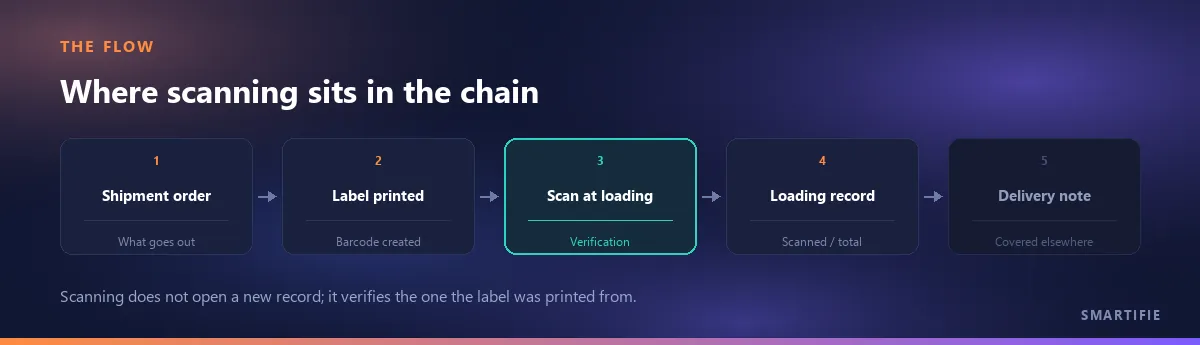
At exactly which point is the check done?
The rule fits in one sentence: as close to the exit as possible. A carton scanned at the packing bench can still move between the bench and the vehicle - it stays on the wrong pallet, gets mixed with another shipment's cartons or is simply left in the warehouse. Scan before those movements and what you verified is not where the carton is, only that it once existed. The right place is the moment before the carton enters the vehicle. The second rule matters as much as the first: the person scanning and the person loading should be the same, or the scanner should at least be able to see the loader. When the reader is in the office and the carton is at the dock, scanning turns into record-keeping; it produces the record but not the control. This article starts after the order lines have been picked from the warehouse; verification during picking is a separate job with its own rules. Once the scanning is done, the next step is closing the paperwork: closing the paperwork when the truck arrives.
What do you do when a scan is rejected?
The most common mistake at the dock is treating every red screen as the same event: it did not read, scan it again. There are four different rejections and each of them describes a different situation. Knowing them apart is the control.
| Rejection | What it means | What to do at the dock |
|---|---|---|
| Barcode format not recognised | What was read is not a label from this flow: it belongs to another system, another product or the carrier. | Set the carton aside and find out who printed the label. Do not wave it through: an unreadable label is information, not an obstacle. |
| No order found for this barcode | The barcode is valid but matches none of the orders in the scanning queue: either the wrong shipment order is open, or the carton belongs to another customer. | Check the open order first. If the order is right, the carton was heading for the wrong vehicle and the scan caught it before it got in. |
| Same barcode a second time | This package already looks scanned in this session. | It has three separate causes; the next heading covers how to tell them apart. |
| No packages left to load | Every package on the order line this barcode points to is already complete; the carton in your hand is one too many. | Check the label rather than the count: most likely two cartons carry the same package sequence. |
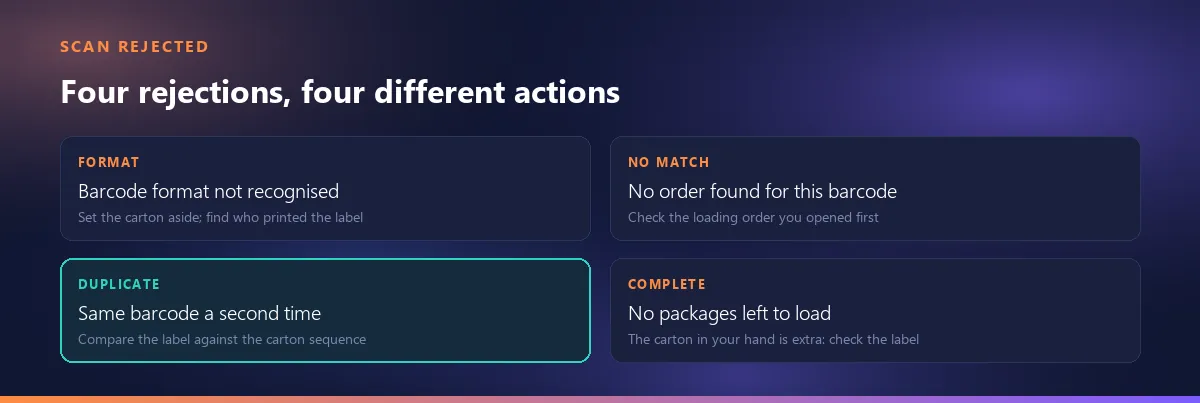
All four share one rule: a rejected carton does not go in the vehicle. Loading it anyway and looking into it later moves the error out of the shipment and into reconciliation. What takes two minutes at the dock becomes two phone calls and a discrepancy nobody can place later on.
The duplicate warning: the most common and most misleading rejection
The operator's first reaction is always the same: I never scanned this one. Usually that is true. The warning has three separate causes and they are nothing like each other. First, the carton really did pass through twice - it came off the vehicle and went back on, or two people worked the same row. Second, the reader sent one scan twice; trigger repeat settings do that and the person scanning notices nothing. Third, two cartons were given the same label.
The third is the dangerous one, because while the system counts one carton as a duplicate, another carton goes into the vehicle without ever being scanned and the total still adds up. Telling them apart is not hard: look at the carton sequence (x/y) printed on the box and compare it with the line the screen shows as scanned. If the same sequence is printed on two cartons, the problem is in the label rather than the scan; the label side is covered in What to put on a carton label.
When the order does not go out in one trip: partial loading
An order does not always fit in one vehicle. Half goes today, the rest two days later; or the customer wants part of it early. In partial loading, the control has exactly one requirement: the packages left behind must stay on the record. The second vehicle's scanning has to continue where the first one stopped rather than start from zero. The way to hold that in-between state is a draft record: even before the load is closed, which packages were scanned and which were not is written down somewhere. Without that intermediate record, your only option on the second run is to recount the vehicle - and nobody can say what the first one actually took.
The detail that matters is where the ratio is kept: scanned versus total has to be tracked per order line, not for the shipment as a whole. A 9/10 at shipment level tells you one package is missing but not which item it belongs to, and you end up walking the warehouse again to work out what goes on the second vehicle.
If you get an everything is already loaded warning
If, as you start scanning an order, the screen says every package on it was loaded in an earlier run, one of two things is true. Either the order really is complete and the cartons in front of you are heading for a duplicate delivery: the customer receives the goods twice and a return process opens. Or the earlier load was marked complete by mistake and these cartons are the ones that should actually go. Neither is something to settle alone at the dock in two minutes.
Turn it into a procedure rule. Before continuing, the system should list which order lines were loaded earlier and in what quantity; and the decision to override the warning - to load anyway - should sit with the shipping supervisor rather than the operator. This is not about trusting people less, it is about where a boundary runs: whoever lives with the consequence makes the call.
Handheld scanner or phone camera?
The answer to can I start without buying hardware is more concrete than most articles make it. There are two input paths and they are not equivalent.
- A keyboard-wedge reader. It reads the barcode, types the text and behaves as if it pressed Enter; the screen takes it as keyboard input. This is the fastest and most reliable path. Its single weak point is focus: if the cursor is not in the scan field, the reader types into nothing. No error, no sound. The operator says it was scanned and the record has no such package. That is why a scanning screen has to show focus state visibly.
- A phone camera. It needs no extra hardware but has a physical limit. When the linear barcode on a shipping label carries a long payload, the narrowest bar - the module - gets thin: a typical eight-field payload printed across 8.56 cm (3.4 in) leaves a module of roughly 0.16 mm. A laser reader copes with that; a phone camera, between focus, motion blur and image compression, does not in practice. The same payload in a QR code 1.75 cm (0.7 in) on a side gives a module of about 0.53 mm, a width a camera separates comfortably.
The decision rule that follows is not the expected one: the device decision starts with the label, not the budget. If your label carries only a linear barcode, a phone camera is not a real option; if you want to work with cameras, the label needs a QR carrying the same payload first. How the two symbols take space from each other on the label is covered in What to put on a carton label.
Does scanning stop when the connection drops?
The dock is usually the worst-covered spot in a building: metal doors, concrete walls, the body of the vehicle. So the question is not theoretical. Answering it means separating two things: being able to keep scanning, and being able to call the shipment complete.
The first is possible without a connection and should be: the session must not be lost and what has been scanned so far has to be written down. The second is not. Calling a shipment complete means that record exists where everyone looks. Marking it complete on a device with no connection creates two different truths on two devices: on one the shipment is closed, on the other it is still open, and nobody can say which is right. The design rule is short: draft while offline, final record while online. In practice that means putting the load into a draft when there is no connection and pushing the same draft to the system once there is; the scans are not repeated.
What is the loading record good for afterwards?
When the scanning ends the job looks done. The value of the record shows up over the following days, in three places. The first is a customer dispute: when someone says items are missing, the argument moves out of memory and into the record. If which package was scanned, when, and by which user is all on file, the conversation is short; with no record at all, both sides have only their own version of events.
The second is internal variance analysis. Order lines whose scanned-versus-total ratio keeps closing short form a pattern: labels for that item print badly, its package count is calculated wrong, or the product gets confused with another in the warehouse. What looks like coincidence one carton at a time becomes a cause once it accumulates in the record. The third is document consistency: the quantity on the paperwork that travels with the vehicle and the quantity actually loaded should match, and the loading record is the only way to compare them. How the document itself is issued, and what to do when the quantity changes, is a separate subject: how a delivery note is issued.
If you have no label to hand while testing your scanner or your flow, you can generate a test barcode with our free generator.
The second trace that can sit under the same record is a photo: attaching the photo to the same record puts the scan trace and the loading photo on the same line, and we covered it in a separate article.
Five mistakes we see most often
- Scanning at an office desk against a list instead of at the dock. If nobody scans while the cartons go into the vehicle and someone ticks the list in the evening, the job being done is record-keeping. Control is what happens while the carton is still in someone's hands.
- Carrying on scanning into a screen that has lost focus. Because the screen stays quiet, the operator believes the cartons were scanned; the record has none of them. Silence is not confirmation - the screen owes a visible answer to every scan.
- Making manual override the routine for labels that will not read. Adding a package by hand should be an escape hatch, not a habit. A manually added package has to sit in the record visibly marked as manual; otherwise the gap between what the record calls scanned and what actually happened disappears from view.
- Two people scanning the same shipment order at once. Each sees a correct count on their own screen and the total comes out wrong. One order, one scanner; if there are two vehicles, open two orders.
- Verifying only on the way out. When a wrong carton enters the warehouse, the error was born at goods-in, not at dispatch. With no verification on arrival, the scan at loading still catches it but catches it late - by then you have bought, put away and counted the goods. And when an incoming delivery is short or damaged? That is a separate article.
What these five have in common is that none of them is about barcode technology. All five are about the same two things: whether the scan really happens at the moment of loading, and where the result is written.
Some of the errors the scan catches are not born at the dock but back when the goods came off the shelf: if the wrong product or a short quantity was picked, scanning surfaces it at loading, though the cause lies further back. That warehouse step has a document of its own — picking list — and which fields it should carry is covered in a separate article. The bin location printed on that list is itself something you design: how the bin location code is built is covered in its own article.
What changes when scanning runs off the record?
In Smartifie Logistic loading is not ticked off on a separate list. The shipment order goes into a scanning queue, and as each carton is scanned the scanned-versus-total ratio advances line by line. A second scan of the same package is rejected, a barcode belonging to an order that is not in the queue is not accepted, and the record keeps which user scanned what and when. A load left half done goes into a draft; because the draft also carries the packages that were not scanned, what remains for the second vehicle is visible there. With no connection the shipment is not treated as complete: the scans wait on the device and are pushed to the system when the connection returns.
Reduced to one sentence: the record the barcode was printed from and the record it is scanned into are the same record. The label is printed from the order, the same barcode is scanned back against the same order during loading, and there is no second list to reconcile in between. The loading report - loaded versus despatched quantities by user, customer and branch - comes off that same record.
It runs on Windows, on Android (APK) and in a web browser, and the interface is mobile-friendly. How the barcode you scan gets onto the label in the first place is covered in How to print shipping labels.