
You have decided to address the warehouse. Maybe you are moving into a new building, maybe you bought scanners and the vendor said locations have to exist first. Then you look it up and find two things: racking suppliers explaining label materials, and forum threads asking how to set up bin locations that nobody answered. The code itself goes untreated. Yet that is where the work is: how many segments, how many digits in each, which characters you refuse to use, and whether the scheme survives the day a new aisle appears. This article takes those decisions one at a time.
The argument in one line: a location code is not a naming preference, it is a tool with two jobs — sorting into the right order on a screen, and being said out loud between two people without being misheard. The test is one sentence as well: if somebody who has never seen the warehouse reads the code and cannot tell where to walk, the code has failed.
What an address solves: not “where is the product” but “where do I walk”
Your stock record already answers one question: how much you have. An address answers a different one: where that stock physically sits. They are not the same and neither substitutes for the other. A warehouse where the quantity on file is perfectly correct and nobody can find the goods is entirely possible; that gap is the reason location codes exist.
So the real customer of an addressing scheme is not a reporting screen but the person walking the floor. For them the code is a route instruction: which way to go, which aisle to turn into, how high to look. When you judge whether a code is any good, the place to look is not the database but that walk.
The second distinction matters even more: an address identifies the place, not the goods. Goods move; the bin stays. A bin keeps its code regardless of what happens to be in it today, and when it empties the code is not deleted — it becomes an empty address. This underpins everything below, because a code that belongs to a place means that changing the code is not relabelling stock, it is relabelling the building. How that route instruction is used at the next step — the document that tells the floor which goods to take from where — is covered separately: the picking list.
Once the code exists, a separate question remains, and it is outside the scope of this article: which item goes into which location, and by what rule.
Anatomy of the code: zone, aisle, rack, level, bin
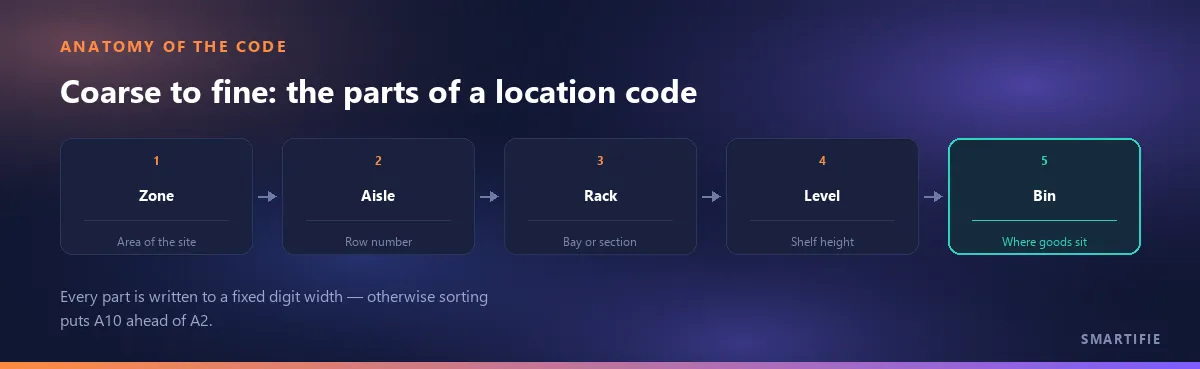
A location code is made of segments, and there is one rule about their order: coarse to fine. Zone first, then aisle, then rack, then level, and the position within the rack last. The reason is not aesthetic: a code built coarse to fine, sorted alphanumerically, lands in the same order as the physical building. A sorted list is the walking order. Build it the other way round — level before aisle, say — and the sort no longer resembles the warehouse, so every screen has to reorder the list again.
How many segments you need depends on the building. In a small single-hall warehouse, aisle–rack–level is usually enough; a zone segment only earns its place when there is more than one hall, a mezzanine or a separate chilled room. Watch the temptation here: building five segments up front because “we might need them” makes the code longer, harder to say over a radio and heavier on every label. But the opposite is not free either — adding a segment later is rarely painless, because old and new addresses then sit in the same list side by side. Decide against the largest warehouse you could grow into without moving, not against today's.
The separator is decided here too: does a hyphen go between segments, a dot, or nothing at all? All three work and each has a defence; the only thing that is a rule is consistency. If you choose a separator it has to be the same one in every address, on every label and in every export. The reason is practical: text typed into a search box and text arriving in an import file are matched character for character, so a hyphen in one place and a space in another produces two addresses that mean the same shelf and are, to the system, different.
Is there a standard for this? What a GLN is, and whether you need one
The plain answer: the bin code inside your own warehouse is yours. No mandatory standard dictates how you build it; you do not apply for numbers and you do not register it anywhere. The confusion usually comes from the GS1 GLN (Global Location Number), but a GLN solves a different problem: it identifies a place to your trading partners. It is a key that speaks outwards, not a scheme for naming your own racking.
GS1 says so in its own support material: “A GLN can be physically marked with a barcode at a location, for example on a dock door or on a storage location”. The application identifier used for that is AI (414), and AI (414) is free to use for location marking only (GS1 support portal). For a sub-location inside a location there is a separate identifier: AI (254), the GLN Extension Component, formatted n3+x..20, and it is always used together with AI (414) (GS1 Denmark, application identifier list).
The practical outcome: build your own code inside, without asking anyone. You look at GLNs only when you need to speak outwards — when a customer asks you to identify delivery points with a number their system already knows. And when that day comes, your internal scheme does not have to change; the GLN is a separate outward-facing layer. The same inside/outside split applies to product numbers as well, and there the decision comes down to a single question: do I need a GS1 barcode.
Digit width and leading zeros: the one decision that breaks sorting
This is where the article pays for itself. Most software sorts an address as text, not as a number, and text comparison runs left to right, character by character. The consequence: A10 comes before A2, because the second character compares 1 against 2 and 1 wins. The day your aisle count passes nine, your sorted list stops being the order of the warehouse — and nothing announces it. The list simply becomes quietly wrong.
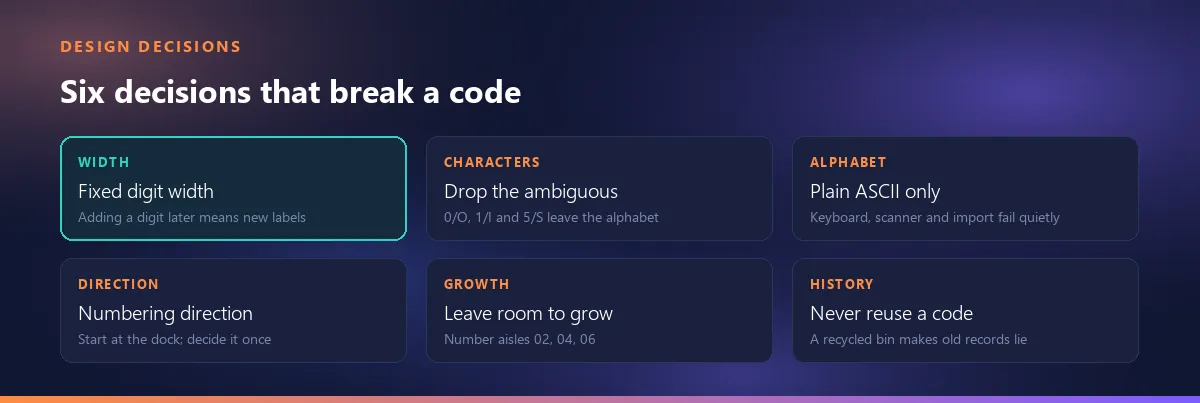
Fixed digit width solves it on its own. Because A02 and A10 are the same length, the text order coincides with the numeric order. How many digits you need is arithmetic: two digits give you 01–99, three give you 001–999. The rule is simple and applied once — the width of each segment is chosen at the start and never changes again.
Why never again? Because adding a digit changes the address itself: A02 and A002 are two different strings. The change touches not only labels but every record carrying that address, every file already exported and any integration mapping built on it. So the criterion is not today's aisle count but your headroom: use two digits even with six aisles, because the cost of the second digit is one character, while the cost of a third row of aisles later is relabelling the building.
Ambiguous characters: the code gets spoken on a radio and written by hand
A location code has two kinds of readability and both constrain the design. The first is visual: in print and in handwriting, 0 and O, 1 and I and l, 5 and S, 8 and B, 2 and Z look alike. The second is spoken: said over a radio or across a noisy hall, B is indistinguishable from P and D, and M from N.
The practical outcome comes in two steps. First, remove one member of each confusable pair from the alphabet — if you are using digits, simply never use the letters O, I, S and B. Second, confine letters to a single segment: usually the zone or the aisle is a letter and everything else is numeric. That reduces the confusable surface from the whole code to one character, and for that one character you can keep a short spoken alphabet on the wall.
Two character sets stay out of the code altogether. The first is accented and non-English letters. The reason is not linguistic taste but silent failure: a changed keyboard layout turns one letter into another, barcode symbologies do not always carry those characters, and a file opened with the wrong encoding renders the address unreadable — with no error message at any stage. The second is spaces and punctuation: space, slash, backslash and hash all belong to the same class of trouble, each with its own side effect in search, in file names and in imports. Keep the code to upper-case letters, digits and the one separator you chose.
Upper case, lower case and the copy-paste trap
Is a01 the same address as A01? Inside your own system it probably behaves that way, because most searches ignore case. In file exchange that guarantee disappears: wherever one side is case-sensitive the two addresses separate and the match fails silently. The fix is not worth debating: pick one form — upper case — and print it that way on the label, store it that way in the record and export it that way.
The second warning in this section is a formatting trap: paste an address list into a spreadsheet without marking the column as text and 01 quietly becomes 1 — the leading zero disappears and the fixed width you just designed breaks across half the list.
The decisions in this section are not confined to location codes: the same discipline applies to item codes.
Aisle direction and numbering: which end you start from, and the odd/even split
All three decisions in this section are preferences, not rules. Nobody can tell you where aisle numbering must begin; the only thing that can be said is that the decision has to be made and has to be describable.
- Which end numbering starts from. The common approach is to anchor on the shipping door, because it is the one reference everybody in the building shares: telling a new starter to stand with their back to the dock is easier than describing north.
- The two sides of an aisle. A common approach is odd numbers on one side and even on the other, so the rack number alone tells you which side you are facing. It is not a standard, just a habit that stuck because it works — marking one side
Aand the otherBdoes the same job. - Direction between aisles. Two options: every aisle starts from the same end, or numbering snakes — one aisle one way, the next in reverse. Both are in use and the choice follows the geometry of the building; there is no source here saying one is faster, only preferences.
To close: the value of the direction decision is not speed, it is describability. The test for defending any of these choices is this — can somebody standing at the door for the first time read the code in their hand and work out which way to turn? If yes, the decision is right; if no, which layout you picked does not matter.
The location label: what it says, which barcode, where it hangs
First decision: the code is printed in human-readable form as well. A location label that is nothing but a barcode stops the warehouse on the day a scanner breaks or runs flat; the eye-readable form of the code is the only fallback that still works when the system does not. For the same reason, if the symbol ends up at an angle a scanner cannot reach, the text itself still has to be readable.
Second decision: the barcode symbology. A location code is short — a few letters and digits — so data capacity is not what decides here; what decides is the character set of your code and what your scanners support. The capacity discussion belongs to the carton label side and is covered separately: what a carton label carries.
The two symbologies you meet most often in a warehouse each have a published standard, and that is a fact you can check in a catalogue record rather than a vendor brochure. Code 128 is specified by ISO/IEC 15417 — “Code 128 bar code symbology specification” — covering the characteristics of the symbology, its data encoding, its dimensions and its decoding algorithm; the national edition in force is SS-ISO/IEC 15417:2024 (catalogue record). Code 39 is specified by ISO/IEC 16388:2023 — “Code 39 bar code symbology specification” — covering symbology characteristics, data encoding, dimensions and tolerances and the decoding algorithm (catalogue record).
The third decision is about height and distance. Labels on the lower levels are read from arm's length; labels on the upper levels usually have to be read from below, from a forklift seat or from the floor. The relationship here is simple and needs no numbers: as reading distance grows, the module of the barcode has to grow, and as the module grows so does the label. Upper-level labels therefore cannot be identical to lower-level ones. You find the right size by testing with your own scanner at the real height, not by reading a catalogue.
Where the label goes follows from the definition of an address: the label belongs to the place it names, not to the goods. When the goods leave, the label stays. That sounds obvious, and yet the most common mistake in practice is sticking the label onto the pallet or the tote, so the address travels away with the stock.
A location label is not a rack load notice
Two different things hang on a rack and they should not be confused. A location label is an identity: it answers “where is this”, it corresponds to a record in a system, and it is what this article is about. A load notice is safety information: it belongs to the racking itself, it comes from the racking supplier and it is posted for an entirely different purpose. Neither replaces the other; printing your address onto the load notice, or merging the two onto one label, weakens both.
The application and maintenance of steel static storage systems is the subject of a separate European standard: EN 15635 — “Steel static storage systems — Application and maintenance of storage equipment” (catalogue record). We state that the standard exists and what it is called, and stop there; we do not relay its contents, because the text is a paid publication and the summaries circulating online do not agree with each other. For rack safety, inspection and liability the right counterparties are your racking supplier and your own health-and-safety obligations — not this article.
When the warehouse changes: new aisles, removed racking, growing without breaking the code
The question everybody hits when setting up a scheme for the first time: if I add an aisle in the middle, do I relabel everything? The answer depends on three decisions you make while designing the code — and they are made at the start, not afterwards.
- Leave gaps from the start. Numbering aisles
02, 04, 06instead of01, 02, 03keeps a free number ready for every aisle that might be squeezed in later. An unused number costs nothing; calling a newly inserted aisle03costs nothing either, compared with shifting every aisle after it. - Digit headroom. The digit width decision above pays off precisely here: an aisle series opened with two digits grows all the way to the ninety-ninth without breaking. Opened with one digit, you lose both the sort order and the labels at aisle ten.
- Never reuse a removed bin. When a rack run is taken down it is tempting to hand its code to somewhere else — the number is sitting there unused. But that code still points at the old place in a year's worth of count records, movement history and exported files. Recycling it does not rewrite the past, it only makes the past lie.
The third point deserves emphasis, because it is the one most often skipped: a location code is historical data too. Being correct for today's list is not enough; a count taken yesterday, an adjustment made last month and a file exported a year ago all have to read that code as the same place. Retiring an emptied code is not wasting a number, it is how you keep the record honest.
Where the address lives: on the label or in the record?
You designed the code, printed it and hung it. Then what? The claim of this section: an address printed on a label with no counterpart in a record is not an address — it is a word written on a wall. For an address to do any work, three things have to sit in the same place: the code itself, what is in it, and when and by whom that was last updated. Without all three you have not built an addressed warehouse, you have merely named the racking.
Why a spreadsheet cannot hold those three together is covered in a separate article: why spreadsheets stop working for shipment tracking.
Honesty is required here, because this article has no module to sell: Smartifie Logistic has no rack or location module. There is no location code field, no location label printing, no stock by address, no put-away step, no aisle or rack definition. The Branch record in the app is a company branch, not a warehouse location — trying to use it as a bin or a rack breaks everything this article describes.
The link the app does hold sits further along: order → shipment order → scanning while loading → carton label → packing list and dispatch document. An addressing scheme comes before that chain, and you build it in your ERP or your warehouse management system. The purpose of this article was never to make that decision for you, only to make the design of the code easier. If you want to see the next link in the chain: scanning cartons at loading.
The close returns to the test the article opened with. When your code is finished, run it yourself: hand a single address to someone who has never seen the warehouse and ask where they would go. If they cannot answer, the segments are in the wrong order, the digit widths are inconsistent, or the code is too ambiguous to be said out loud. If they can, the code is ready — what remains is making sure that address really lives in a record.