
A picking list is the document that tells the warehouse operator which product to take, how many, and from where. Picking is the most labour-intensive step in fulfilment: most of a warehouse's labour cost is spent walking between racks. How the list is built decides how much of that walking is wasted.
This article covers what a picking list is, which fields it carries, who produces it, which of the four picking methods pays off in which situation, the real difference between a paper list and a device screen, and how the list connects to the shipment.
What is on a picking list?
Unlike a packing list, a picking list is an internal warehouse document; it never reaches the customer. So it carries location data rather than commercial data: product code and name, quantity to pick, aisle/rack/bin location, order reference and the picker. On a good list the lines are sorted by rack sequence, so the operator does not walk back and forth.
Taking the fields one by one: the <strong>product code</strong> is the backbone of the list, because two different products can have similar names but not similar codes. The <strong>quantity</strong> must carry its unit — "12" on its own does not say whether it means twelve pieces, twelve cartons or twelve metres, and that ambiguity is one of the most common sources of error on the floor. The <strong>location</strong> field carries the addressing logic of the warehouse; a layered address such as aisle-rack-level-bin is far more useful than a single "warehouse 2". The <strong>order reference</strong> says which job the list belongs to, and it is the only way to match it against the dispatch document later.
What goes into the location column is a decision made before the list exists — how many digits the aisle, rack, level and bin carry, which characters are kept out, and whether the numbering survives the warehouse growing. Where the location code on the list comes from is covered in a separate article.
Two more fields get skipped often. The first is the <strong>lot or serial number</strong>: in food, cosmetics, pharma, chemicals and spare parts, which lot was picked has to be recorded in case of a later recall. The second is the <strong>expiry date</strong>: for anything with a shelf life the list should reflect first-expired-first-out (FEFO), otherwise ageing stock piles up in the racks. Without these two fields the list does the daily job but leaves no backward trace when something goes wrong.
Who produces the picking list?
A picking list is not a document you type; it is a <strong>derived</strong> document. Its source is the order itself: an order dropping in from the web shop, an order form from a dealer, or a sales order opened in the ERP. The system takes that order, decides which product comes out of which location, and produces the list. Typing the list by hand means entering the same data a second time — and sooner or later the two copies drift apart.
The real decision behind producing the list is stock allocation: which stock is reserved for which order? Without allocation two separate picking lists can point at the same goods on the same shelf; whoever gets there first takes them and the second picker finds an empty bin. Most "the system said it was in stock but it wasn't" complaints are born right here. With allocation the stock stays physically on the shelf but is treated in the system as promised to another order.
When the list gets printed is a decision too. In small warehouses the supervisor prints as orders arrive. As volume grows that breaks down and gives way to a cut-off time: orders accumulated during the day turn into lists all at once at a set hour, and the shift is planned around them. The cut-off is usually set against the carrier's collection time — because an order that was picked but missed the vehicle costs more than one that was never picked.
Do not confuse picking lists with packing lists
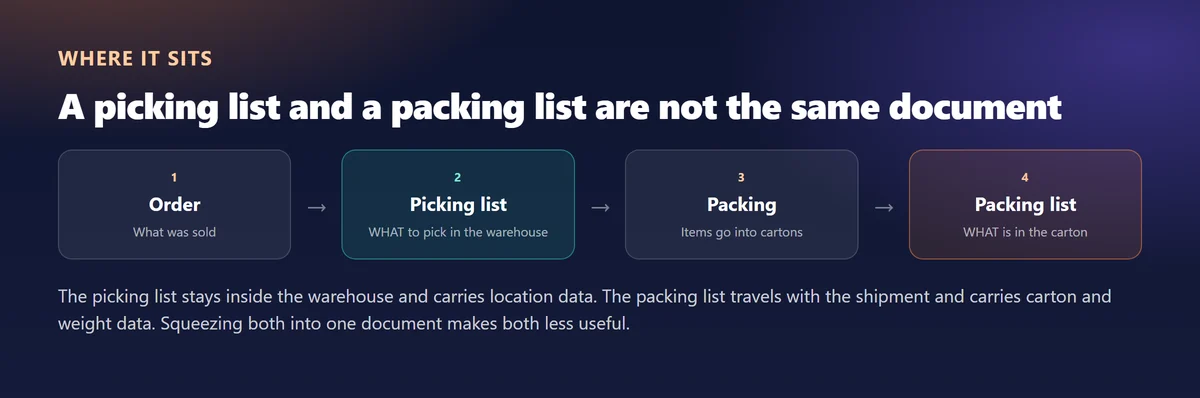
Because both are "lists" they get mixed up, but they belong to different steps and carry different information. The picking list stays in the warehouse, carries locations and is used BEFORE packing. The packing list travels with the shipment, carries carton and weight data and is produced AFTER packing.
The practical distinction is this: an error on the picking list can be caught inside the warehouse, while an error on the packing list gets caught at the customer's door. Putting a verification step between the two — scanning the picked goods once more while packing — keeps the mistake in the cheap place. And because the picking list never reaches the customer it carries no commercial data such as discounts, unit prices or tax; if it does, you are showing warehouse staff information they do not need.
Four picking methods
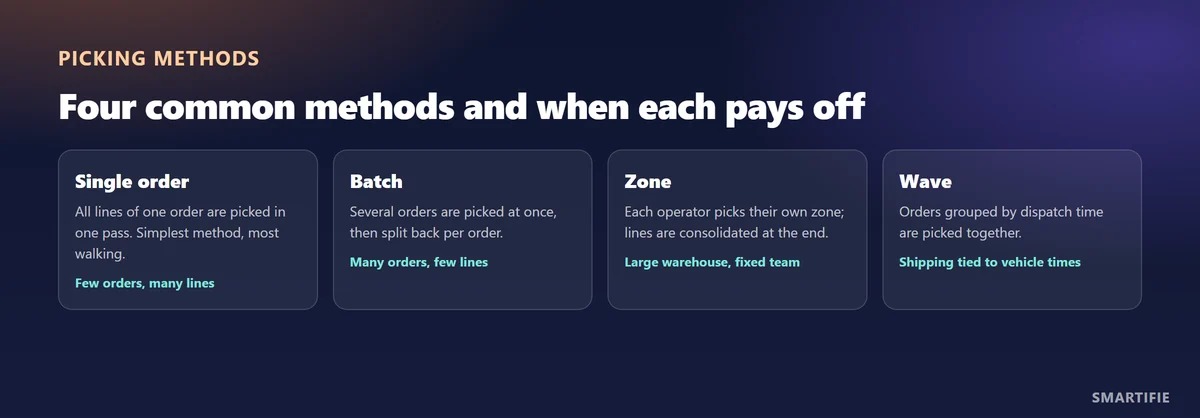
The right method depends on warehouse size, order count and lines per order. No single method suits every business; many warehouses switch method by season.
| Method | How it works | When it pays off | Its risk |
|---|---|---|---|
| Single order | One operator picks one order from start to finish. | Low order count, many lines per order, project or B2B shipments. | Walking distance multiplies as order count grows. |
| Batch | The same product across several orders is picked in one go, then split per order. | Many orders with few lines each — typical e-commerce. | The sorting step is a new error point; it must be checked afterwards. |
| Zone | Each operator owns a zone; the order travels between zones. | Large warehouse, different storage conditions (cold room, hazardous goods). | An order can stall at the handover between zones. |
| Wave | Orders are grouped by vehicle time or carrier and picked together. | Fixed collection times, several carriers. | A single delay in the wave can make the whole group miss the vehicle. |
There is one question to ask when choosing: how many lines per order, and how many orders per day? Few orders with many lines points to single-order picking; many orders with few lines points to batch. If the warehouse is physically large or contains separate conditions such as a cold room, zone picking becomes unavoidable. If you work to fixed collection times, wave picking forms on its own — the warehouse runs to that rhythm whether or not you give it a name.
Paper list or device screen?
Paper lists are still common not out of laziness but for three concrete advantages: they cost nothing, they need no training, and they keep working when the network goes down. In a small warehouse shipping thirty orders a day a paper list is a perfectly reasonable choice, and buying devices brings no measurable gain.
The real weakness of paper is the missing feedback. When the operator takes the wrong item, paper does not say so; the error surfaces at the packing bench or at the customer's door. A device screen can say "that is not the item" at the moment of scanning, show the remaining quantity, and report a short pick to the system immediately. The difference is not speed — it is <strong>where the error gets caught</strong>.
In practice most warehouses sit somewhere between the two: the list is printed on paper, but every item is scanned at the packing bench. This hybrid catches the error before it leaves the building without paying for devices, and it is usually the best middle ground for a small business. If you do move to devices, account for the physical conditions: touchscreens with gloves on, battery life in a cold room and wireless coverage in the far corner of the warehouse are the three places paper-to-device projects most often get stuck.
Four ways to cut picking errors
- Sort lines by rack sequence. The wrong order can double the walking distance.
- Do not place lookalike products next to each other on the list; it raises the chance of a mix-up.
- Scan every picked item. Visual checking is the weakest link on a tired shift.
- Mark short picks on the list; if packing does not learn about the shortage, the error moves downstream into the shipment.
What these four have in common is making the error <strong>visible</strong> instead of ignoring it. A short pick does not disappear because nobody wrote it down; it just moves to the next step and costs more there. Likewise, if you do not measure the error rate you cannot tell whether you are improving: how many lines were picked, how many needed a correction — keep those two numbers and within a few weeks you can see whether a change of method actually worked.
Connecting the picking list to the shipment order
A picking list is not an end in itself; it hands a finished step over to the next one. The carrier of that handover is the order reference: picked items connect through it to the shipment order, and through that to the delivery note and the packing list. The moment the reference breaks, the rest of the chain falls back to manual matching.
The critical case is the partial pick. If an order has ten lines and nine could be picked, the shipment order has to know — otherwise a ten-line delivery note is issued against a nine-line load and the difference shows up at the customer. So the shortage must not stay on the list; it has to travel to the next document. The same goes for over-picking: goods that leave in excess through a counting error come back as a return and a credit note.
The second link is the relationship between a picked item and a carton. If you do not record which item went into which carton, then when the customer says "three cartons arrived, one is missing" you cannot say which items were in it. Give every carton a unique barcode and that question is answered in a second — and at exactly that point responsibility passes from picking to shipping.
Handing over from picking to shipping
As soon as picking ends, the information changes hands again: items go into cartons, cartons go onto the vehicle. If information is lost at that handover, the shipment goes out wrong no matter how well the picking was done. Giving items and packages an identity — a unique barcode per carton — prevents that loss.
To be clear: in-warehouse picking lists are built in Smartifie Warehouse; stock is allocated by lot and expiry date, and reservations stop the same stock being allocated twice. Picking, packing and returns come with the Fulfilment pack or the Enterprise plan. Smartifie Logistic covers the chain from order to dispatch — shipment orders, loading orders, barcode scanning and barcoded carton labels. So whichever tool you build your picking list with, the next step — carton identity and loading accuracy — is handled in Logistic.
Scanning every carton as it goes onto the vehicle means a shortage missed during picking still gets caught before the doors close. How that works on the dock is described in verifying a load by scanning barcodes.
To build the document that travels with the shipment, see How to Prepare a Packing List. If you run these steps in a spreadsheet, Why Spreadsheets Stop Working for Shipment Tracking explains where it breaks down.