
A quote number's SHAPE — prefix, year, width, separator — is yours to pick, and you can change it any time. But the COUNTER is a separate thing: changing the format never renumbers your past quotes and never resets the counter. On top of that, adding a branch code to the number splits the counter itself, and adding a year stamp turns it into a counter that resets every January. This article covers why Smartifie Quote keeps these two layers — shape and counter — apart, and which decision triggers which behaviour.
What a quote number's "shape" means: prefix, year, width, separator
In Quote, a quote number has five parts: a prefix (e.g. QUO), a year stamp (none / 2 digits / 4 digits), how many digits the running number has (3 to 12), a step (how much the number advances each time — 1, 2, 5, 10 or 100), and a separator (dash, slash, dot, underscore, or none). The default shape looks like QUO-2026-000001. Every field on the settings screen carries one of THREE states, not two: "use the default" (nothing chosen yet, the product's recommendation shows as a placeholder), "none" (e.g. no prefix at all), or a value you picked yourself. That distinction matters: a form pre-filled with the recommended value looks identical to an untouched form but MEANS something different — one says "the company deliberately chose QUO-2026-000001", the other says "the company hasn't decided, the product's recommendation applies". Nothing is written to the database until you hit Save.
Format and counter are two separate things: changing one doesn't reset the other
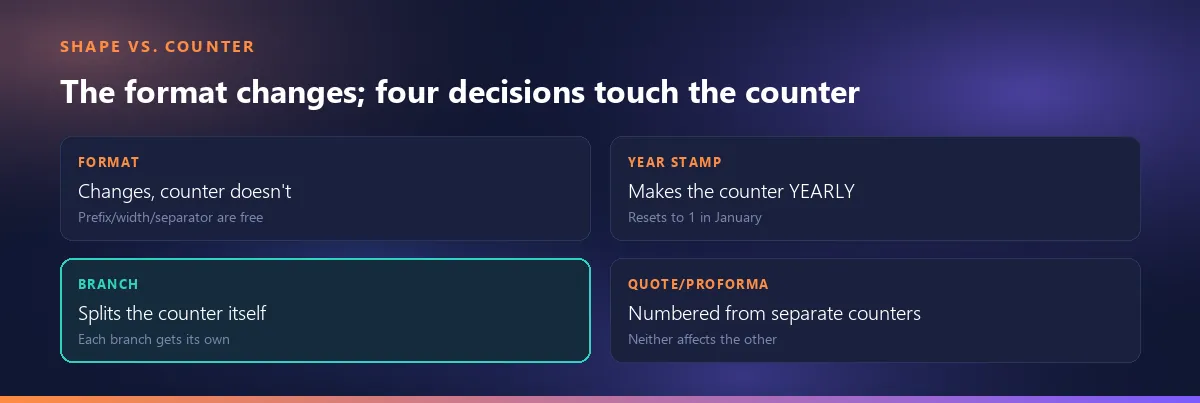
This is the central claim of this article. Quote's own code comment says it outright: keeping the shape (NumberScheme) and the counter (DocumentNumberSequence) apart is a deliberate design decision. Change the prefix, the separator or the digit count and your past quotes keep their old numbers — none of them get renumbered — and the counter isn't rolled back either; new quotes simply carry on from where the counter stood, just spelled the new way. The same logic applies to the "Clear" button: it resets the shape to the default but DELIBERATELY leaves the counter untouched, because resetting it too would restart it from a number that already collides with existing documents, and every save after that would fail on a duplicate key.
Adding a year stamp turns the counter YEARLY
A year stamp looks like a cosmetic setting but it actually decides the counter's BEHAVIOUR. Choose no year stamp (0 digits) and the counter simply keeps climbing, year after year, without ever stopping. Add a 2- or 4-digit year and the counter becomes specific to that year, restarting at 1 every January. This is the exact value written into a column of the counter table in the database — not a cosmetic choice, but a decision about which column the counter lives in. In practice the difference shows up like this: a company with the year stamp on gets QUO-2027-000001 as its first 2027 quote, regardless of what number 2026 ended on; a company with it off has the counter simply continue from wherever 2026 left it (say, 000847).
Adding a branch splits the counter itself, not just the text
When you add a branch group to the number, you are not just printing a branch code on top of it — you are giving every branch its own independent counter. Without a branch group, a single tenant-wide counter is shared across all branches. Here's what that means in practice: if the Istanbul and Izmir offices share the same counter and Istanbul takes QUO-2026-000010, Izmir's next quote becomes QUO-2026-000011 — it won't look sequential within Izmir's own history, because the counter is shared across branches. Add the branch group and that "jumping" stops: each branch sees its own 1, 2, 3… sequence. The settings screen flags this separately as a warning, because there's no other way to show that behaviour on the form itself.
Is a quote number a legal requirement?
This question gets a different answer depending on the country, and the three need to be kept apart rather than blended into one.
For Spain the primary source is clear: Article 6.1.a of RD 1619/2012 requires correlative numbering within series only for the "factura" (invoice) — it reads "la numeración de las facturas dentro de cada serie será correlativa". The word "presupuesto" (quote) or "factura proforma" (proforma invoice) never appears in that article; so a quote and a proforma fall OUTSIDE that regulation's scope. That said, Spanish accounting sources (faconia.com, pymesyautonomos.com) still recommend giving the proforma its own series even though it isn't a legal requirement — the reasoning being that otherwise the traceability of the real invoices can get muddled.
English-speaking markets show a similar pattern: unlike a real invoice, a proforma has no official numbering regime of its own, but the practical advice — from accounting guides such as tinytax.co.uk, which is a secondary source, not statute — still points toward using a separate series, on the grounds that otherwise an audit can turn up a gap or a duplicate number in the real invoice series.
For Turkey this article does NOT cite a specific statute article number. A quote is not an invoice, so it's your own needs — not a law — that shape the number on it, but we are not claiming here which statute article binds which document, because we could not verify a primary source on this in this research pass.
Why a quote and its proforma aren't numbered from the same counter
In Quote, a quote and a proforma each have their own document-type key and therefore their own counter; their default prefixes are QUO and PI, and both stay the SAME across every interface language (deliberately not translated — a Turkish company exporting to Spain does not want a Turkish abbreviation on the document). We've already covered, in a separate article, how a proforma gets its own permanent number the first time it's exported — we don't repeat that here: how the proforma gets its own number on first export. Worth adding: this separation already matches the "use a separate series" advice covered above — in this product, quote and proforma already use separate counters, so there's no extra setting to turn on for this.
What happens to the counter when data moves from one place to another?
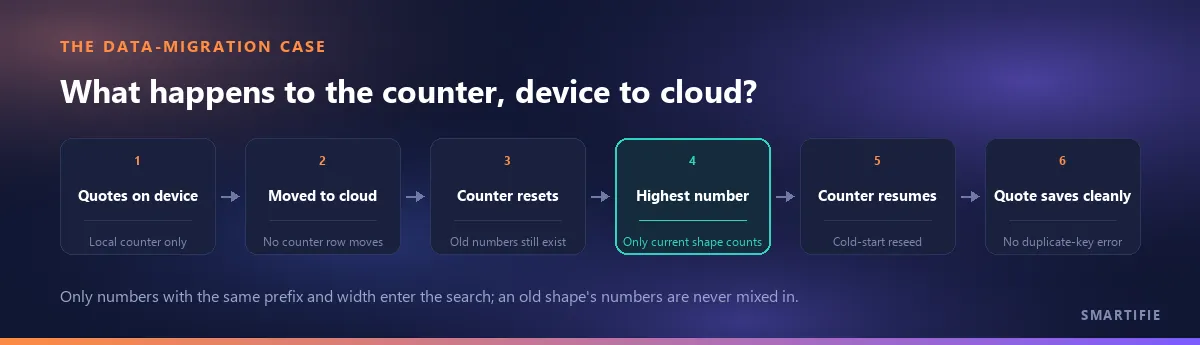
When data moves from a device to the cloud, or into a new installation, the counter row does NOT come along on that move — only the documents do. On the first save afterward, the product looks among the existing documents for the largest number that matches the CURRENT shape (same prefix, same total width) and starts the counter FROM there. That search carries an important limit: numbers produced under a different, older shape never ENTER that search — only numbers matching today's shape, both prefix and width, count. The product's own code comment spells out why this matters: without this reseeding, a counter left behind would start from a number that collides with existing documents, and every new save after that would fail with a permanent duplicate-key error — this ecosystem has already lived through that once.
What we do here, and what we don't
A number is issued ONLY at the moment of saving (hitting Save) — not while the form is open or a draft is being typed. The reason is simple: an abandoned draft doesn't "burn" a number, so a cancelled quote never opens a gap in the counter. The Step can be set to 1, 2, 5, 10 or 100, but the FIRST number is always 1 — never the step itself; that keeps a company that picks a step of 100 from having its very first quote come out as "number 100". The preview number on the settings screen is computed live but is NEVER stored — it's only a forecast; if another user saves first, the number shown changes.
There's a limit worth stating plainly: an order number type is also defined in this system and its format can be set up in advance, but the product does NOT issue any order document today — that type sits ready for later use, but it doesn't assign a number to anything yet. This should not be read as "the product manages orders".