
An export proforma asks for a handful of fields a domestic quote never shows: an HS code, a country of origin, a delivery term (Incoterm), a bank account. Here is what this article reports — these fields already exist in Smartifie Quote, just hidden by default so a domestic quote does not print blank columns. Turning an export quote into a proforma is not a matter of learning new software; it is turning on a few settings once.
What does turning a quote into a proforma mean in Quote?
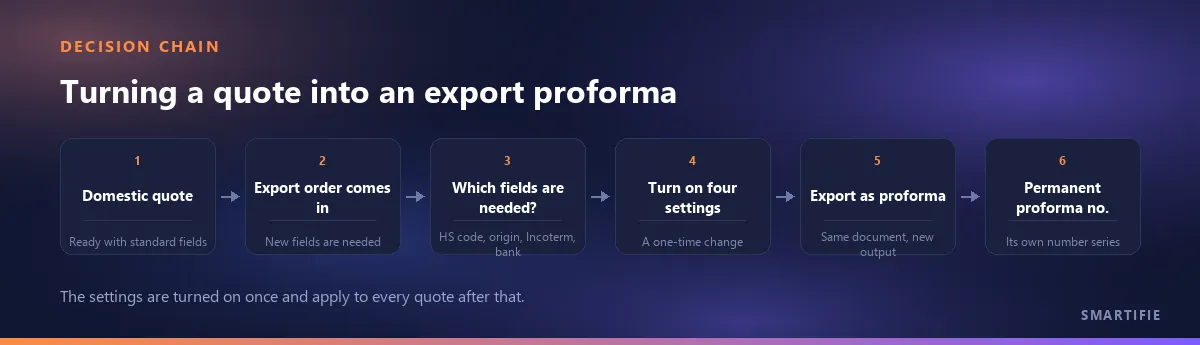
In Quote, "quote" and "proforma" are two separate export buttons on the same document, downloaded separately. The first time a proforma is exported it is assigned a permanent proforma number from its own series — independent of the quote number, and it does not change afterwards. The document's heading changes too: the output prints under the "PROFORMA INVOICE" title. We are not discussing the general difference between a quote and a proforma here; this article is about which fields an export proforma needs on top of that, and how to turn them on.
If that same document is priced in a foreign currency, which day the rate is frozen to is a separate matter, covered separately: which day's exchange rate goes on a foreign-currency quote.
The four sections below go through the fields specific to an export proforma one by one — which sits on the line and which on the document, and which is shown by default and which is hidden.
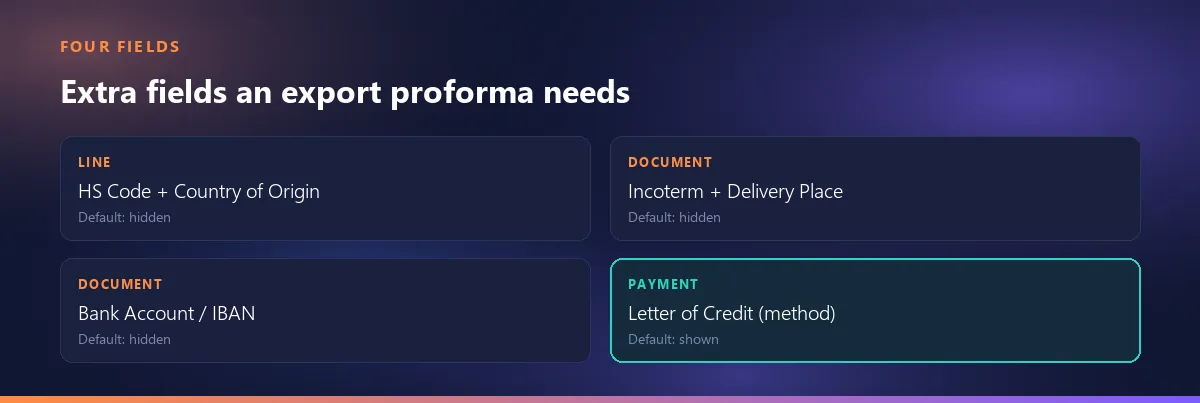
The customs identity of the goods: HS code and country of origin
Quote's line model carries an HS/tariff code field and a country-of-origin field. Both are hidden by default on a domestic quote; turn them on and they appear as their own columns in the editor, in the PDF and in the preview. We are not explaining what the code itself means here — that is covered in depth in a separate article, linked at the end of this one.
There is a difference between the two, and it matters in practice. The HS code also lives on the product card; when you pick a product for a quote line, the card's code is copied onto the line automatically if the line's own code is empty. So once you write the code onto the product card, you do not have to type it again on every quote. There is no such shortcut for the country of origin: that field exists only on the line, has no counterpart on the product card, and has to be entered per line on every export quote.
Is the trade term a field, or is it a rule?
In Quote the trade term is a document field: the Incoterm code (one of the ICC's eleven codes such as EXW, FCA, FOB or CIF) and the delivery place sit on the document as two fields to fill in. The codes are not translated — the three letters stay the same in every language, only the explanatory sentence in the picker changes. Both are hidden by default; turn them on and a selector plus a delivery-place box appear in the editor, and the document prints "Incoterm Delivery Place" as a single line.
This article will not explain the Incoterm rules themselves — who carries the cost and the risk from where to where — that is the International Chamber of Commerce's own copyrighted text, and not the subject of this site. What we cover here is only the field itself: a box to fill in, not a rule to learn.
The IBAN line that a letter of credit asks for
A sale against a letter of credit is expected to show a bank account on the proforma. In Quote this is a document-level free-text field, hidden by default. Turn it on and the company bank details you wrote once (IBAN, bank name, SWIFT and so on) come up as the default text, and print on the PDF as soon as at least one line is filled in. So you do not retype the bank details on every quote — you write them once in settings, and every new export proforma has them ready.
Letter of credit as a payment method
Among the methods listed on the payment plan rows there is also "Letter of credit". Unlike the previous three sections, you do not have to turn this one on separately — the payment plan section is already shown by default in Quote, and a letter of credit is simply one of the options you pick. We are not explaining how a letter of credit itself works here — the presentation requirements, the bank's role, the UCP 600 rules; Quote does not manage that process, it only lets you select it as a payment method.
What changes when you pick the "Export" sale type?
Among Quote's eight sale-type options, one is "Export", and it prints on the document translated into the customer's language. This section, too, is already shown by default — unlike the previous four sections, there is no extra setting to turn on here, you simply pick the correct sale type.
How to decide which fields to turn on
Why are three of the four fields listed above (HS code/origin, Incoterm/delivery place, bank account) hidden by default? Because on a domestic quote those columns would come up empty, and an empty column clutters the document — the buyer does not ask why there is a gap there, but their eye catches on it. Quote has not removed these fields, only hidden them by default; they come back with a single switch the moment you need them.
In practice it comes down to this: when an export order comes in, before turning the quote into a proforma, turn on the four settings — the HS-code line, the origin line, the Incoterm/delivery place, the bank account — once. If you work from the same account or the same template, this is a one-time job; you will not need to hunt for these settings on every export quote after that.
What the product does not do today: dimensions, weight, package count
Honesty is due here. Line-level fields for dimensions, weight and package count (width, height, depth, volume, net and gross weight, package count) exist in the data model — but none of them can be entered on any screen, and none of them print on any document. There is no box for them in the editor, no column in the preview, no line on the PDF. We cannot say "you can turn this on in settings", because these are not visibility toggles like the HS code or the Incoterm that flip on and off with a switch — they are fields the user cannot reach from anywhere.
If your export proforma needs to show net or gross weight, dimensions or a package count, for now that information has to be prepared outside Quote — on a separate packing list, for instance.
What HS-code and weight abbreviations actually mean is not covered here
This article does not explain what an HS code means, what N.W./G.W./CTNS/PCS stand for, or which abbreviation belongs on which document — we cover that in depth in a separate article: what the HS-code and weight abbreviations mean.
A tool that produces both the quote and the proforma from the same document