
The customer read your quote and asks one thing: “Is sales tax included?” If the quote doesn't say, the answer ends up in an email thread, and in that thread the two sides may be carrying different numbers in their heads. Search for it and you get calculators, forum threads and summaries of a single ruling. What is missing is a page written from the sales desk: what changes from one place to another, and what the document itself should say. That is what this article covers.
The short answer: a quote that doesn't mention sales tax is really two different prices. Which one counts is decided by a court, a statute or a regulation depending on where you are, and the answer is not the same everywhere. A single sentence written on the document keeps that decision in your hands.
The customer asked “is tax included?”: the same lines, two grand totals
Here is how big the gap is, with an invented quote of two lines: one item at a unit price of 2,500 with tax at 6.5%, quantity 2; one item at 800 with tax at 6.5%, quantity 1. (The rate is only an example and not a statement about any state.) The numbers on the lines never change; only the way they are read does.
| Reading | Subtotal | Tax | Grand total |
|---|---|---|---|
| Prices exclude tax | 5,800.00 | 377.00 | 6,177.00 |
| Prices include tax | 5,446.01 | 353.99 | 5,800.00 |
Same two lines, a difference of 377.00. If the customer budgeted for 5,800 and the document asks for 6,177, the conversation is no longer about price but about what the document says. For the seller the difference comes out of margin; for the buyer, out of budget. (In the tax-included reading the net amount and the tax are worked back out of the inclusive price; that calculation and its penny rounding have their own article, linked below.)
What counts when the quote doesn't say?
Washington. There is no single US rule, so take two states as examples. Washington's rule (WAC 458-20-107) presumes conclusively that a selling price does not include retail sales tax, and requires the tax to be stated separately on the sales document, even where the parties have agreed that the price includes tax.
California. Whether a seller can add sales tax reimbursement to the price depends on the terms of the sales agreement; if the agreement provides for it, shows it on the sales document or posts it, it is presumed to have been added, and a price advertised with specific wording is presumed to include it (Civil Code §1656.1; see also CDTFA Regulation 1700). We summarise rather than quote the statute here. The upshot: the same silent quote can lean opposite ways in two states, and other states have rules of their own.
This is not legal or tax advice; for a concrete dispute, ask your attorney or tax adviser.
If the buyer is a consumer, the rule starts from a different place
A quote between businesses commonly shows tax separately; a price to a consumer is a different matter. In Washington, advertising a price as “tax included” is only allowed under the conditions the rules set (RCW 82.08.055, as applied in the same WAC rule linked above). In California a price posted with the wording the statute lists is presumed to include the tax (Civil Code §1656.1(b)). In short, in both states the way the price is displayed to the buyer decides how it is read.
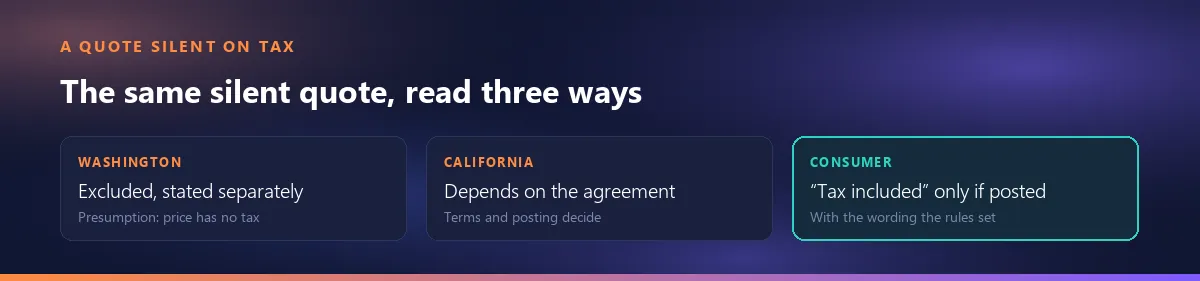
That is why B2B and B2C quotes call for different modes: the reader looks at the same lines, but the expected reading is different.
Which basis do you quote on: a decision per buyer, not a habit
- Selling to a business (B2B): prices exclude tax and the tax appears as its own row. The buyer usually recovers it; what they compare is the net price.
- Selling to a consumer (B2C): tax-inclusive price. The number on the document is the number the customer pays.
- Selling to the public sector: whatever the tender documents and the bid form say.
If your customers are a mix, the company sets the default and the individual quote sets the exception. That is exactly the split in Smartifie Quote: the company default lives in Settings and each quote has its own box for it (described below). Whether you entered prices with or without tax is also printed on the document, so the document speaks rather than habit. If the same question comes up on the proforma side, the free proforma invoice generator covers it separately.
Where on the document: the heading, the note and the tax row
There are three places: the amount column's heading, the note under the totals, and the tax rows by rate. Why those three make a quote checkable by hand, and how line and total rounding work, is covered in VAT by rate, a basis note and a column heading, a separate article.
The one thing this article adds: the words “excluding tax” belong next to the amount, and the note belongs under the totals. If one of them is missing, the customer asks by email. Shorthand such as “plus applicable taxes” is widely accepted, but it leaves the rate open, which is why a row per rate is the sturdier choice.
After sending: can you say “actually, tax was included”?
No, not by changing the document. On a sent quote the basis is locked, and that includes the tax-included box. Changing the basis takes a new revision, and the customer sees the revision as a new document. That is how a quote sent on the wrong basis gets fixed: not a silent correction, but a visibly new version. How revisions are tracked is described in editing a quote after it has been sent.
When the accepted quote becomes an invoice
A quote is not a tax document; an invoice shows the tax as a separate line. In Washington the sales document has to state the tax separately (the WAC rule linked above, which rests on RCW 82.08.050), so a quote that already shows tax on its own row does not surprise anyone at invoicing. Smartifie Quote does not issue invoices; this section only explains why the quote and the invoice should read the same way.
In Smartifie Quote: the tax basis is written on every document
The video shows this on screen: a fictional quote for a hotel group, the same lines and two totals. The steps (the app labels sales tax as “VAT”):
Watch how it works
Real screens, start to finish.

Does a Quote Include Sales Tax? Say It on the Quote | Smartifie Quote
Does a quote include sales tax? How to state it on the quote itself in Smartifie Quote: the company default, the "Prices include VAT" box, the amount column heading and the note under the totals.
The video loads from YouTube when you press play.
- The company default: Settings → Calculation → Price entry mode (excluding / including VAT). It only sets how new quotes start; quotes you already made keep their own mode.
- A box on each quote: Prices include VAT. Tick it and the totals recalculate at once; not one line price changes.
- The column heading: Amount ex. VAT or Amount inc. VAT, on screen, on cards and in the PDF.
- The note under the totals: “Unit prices exclude VAT.” or “…include VAT.”, in the preview, in the PDF and on the customer's approval page. You can't forget to type it, because it prints on every document.
- The tax breakdown: with it on under Settings → Document (the default) the tax prints rate by rate; with it off, tax shows as a single row and is never hidden.
- Allowed rates: a line's rate is picked from the list of rates your company wrote.
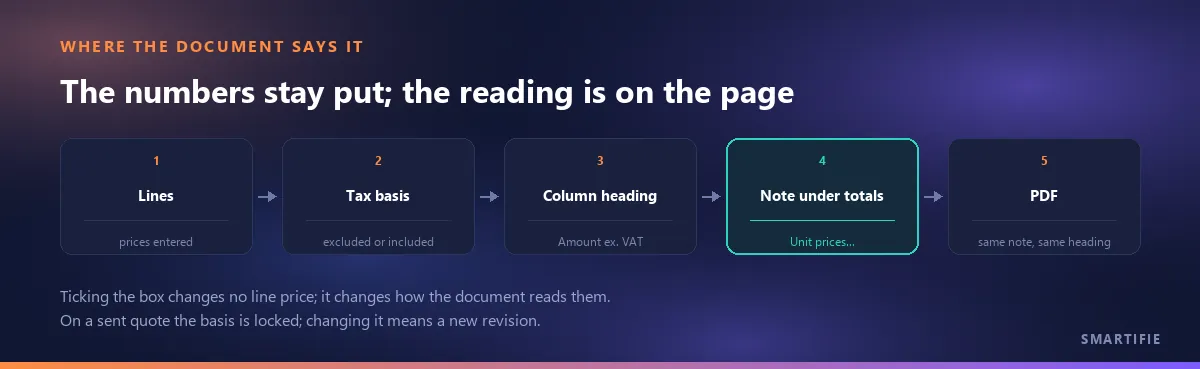
And what we don't do. Smartifie Quote does not tell you which tax rate applies and does not choose one for you; you write the list of rates. It does not issue invoices: a quote and a proforma are not tax documents. Nor is it the product's job to apply or check any of the legal positions above; what it does is make sure the quote says which basis its prices are on.
To close, in one line: a quote with no tax basis is two prices; a quote that states it is one. Write it down.