
You sent the quote. The customer's bookkeeper ran the line totals through a calculator and came back with: “Your grand total is a penny short.” Or it happened on your side: you summed the VAT column of your own spreadsheet and it does not match the VAT total underneath. Search for it and you get forum threads and software help pages, each explaining what one particular program does. None of them tells you which of the two calculations protects what, and what the person preparing the quote should actually decide. That is the gap this article fills.
The short answer: a penny gap on a quote is not a mistake, it is the result of a choice. Round each line and then add them up, and the printed list adds up to the printed total. Add everything up first and round once, and the total is rounded in a single step, but the customer can no longer check the document by hand. Both calculations are legitimate. The job of whoever prepares the quote is to make that choice deliberately and to know in advance where the difference will show up.
The customer added it up by hand and got a penny less
The reassuring part first: most likely nobody got the arithmetic wrong. Your software and the customer's calculator are both working; they are answering different questions. In any currency with cents, every amount has to be rounded to two decimals, and a number multiplied by a rate such as 20% rarely lands on a whole cent. Depending on when the rounding happens, the result moves by a penny.
The second reassuring part: the difference does not vanish, it gets put somewhere. Either it shows in the lines (the rounded lines add up to something a penny away from a separately calculated total) or it shows in the total (the total printed at the bottom is a penny away from what the lines add up to by hand). No method makes that penny disappear; each one only decides which view it appears in. The customer's phone call simply means the difference appeared exactly where they were looking.
Nor does a penny gap come from a single place. There are five decision points, and we take them one by one below: when you round, which way you round, the order of discounts, whether prices include VAT or not, and the percentages in the payment plan. Settle one deliberately and leave the other four to whatever the software defaults to, and the difference still appears, just from somewhere else.
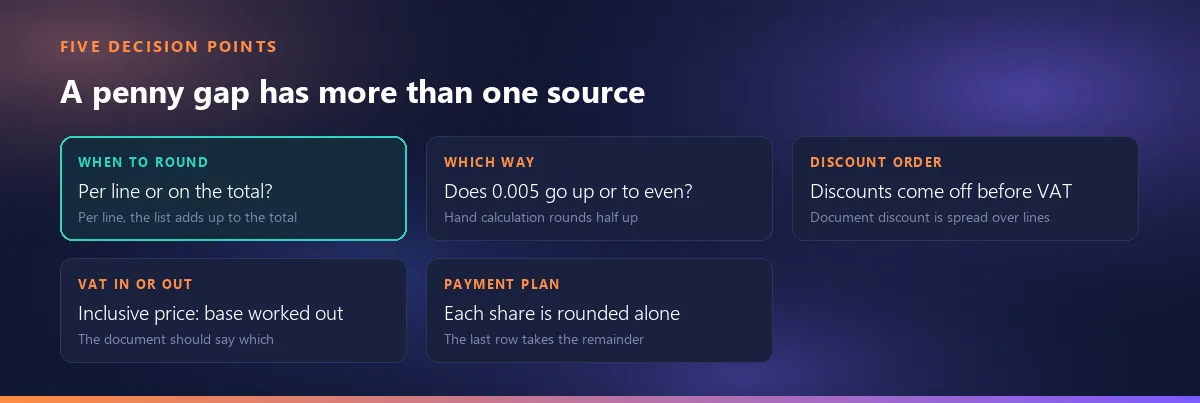
Where the penny comes from: two legitimate calculations, two different results
Here are the two calculations. One: work out the VAT on each line, round it to the cent on that line, then add up the rounded line VATs. Two: add up the net amounts of all lines, then calculate the VAT on that total once and round it once. The maths behind the gap is simple: the sum of rounded numbers does not have to equal the rounded sum. The tiny fractions added or dropped on each line accumulate, and with enough lines they cross a penny.
Example: the same three lines, two different totals
Three lines, all at 20% VAT. Each line's VAT is rounded on the line:
| Line | Net | VAT 20% (exact) | VAT (rounded per line) | Line total |
|---|---|---|---|---|
| 1 | 10.13 | 2.026 | 2.03 | 12.16 |
| 2 | 20.13 | 4.026 | 4.03 | 24.16 |
| 3 | 30.13 | 6.026 | 6.03 | 36.16 |
| Total | 60.39 | 12.078 | 12.09 | 72.48 |
Add up first and round once instead: 60.39 × 20% = 12.078 → 12.08, and the grand total is 72.47. One penny apart. A customer who adds up the line totals by hand gets 72.48; if the bottom of the document says 72.47, that is the penny they are looking for. What happened? Each line was rounded up by 0.004, and over three lines that added up to 0.012. A single rounding at the end does not carry that accumulation; it only rounds the total up by 0.002.
The net amount is rounded too: why “gross − discount” has to add up
The same thing happens before VAT, on the net amount. If a line has a discount, the document prints three numbers: gross, discount and net. Example: 1.5 kg × 6.67 = 10.005 → gross 10.01; a 5% discount of 0.50025 → 0.50. Calculate the net at full precision and round it on its own, and you get 9.50475 → 9.50. Yet the paper says 10.01 − 0.50, which is 9.51. If the document claims that gross minus discount equals net, that equation has to hold with the printed numbers. The way to get there is not to round the net separately but to derive it: printed gross minus printed discount. That is exactly the one-cent gap between Round(a − b) and Round(a) − Round(b).
In a quote with more than one currency the same principle reaches one step further. The lines are converted into the document currency at the rate frozen on the quote — see freezing the exchange rate onto the quote — each line is rounded after conversion, and the totals are built from those rounded figures. Converted amounts follow the same rule: the printed lines add up to the printed total.
Which invariant are you choosing: a document you can check by eye, or a total rounded once?
Both calculations can be defended. The useful question is not “which one is right” but which equation do you want to hold every time?
- Rounding per line protects this: the printed lines add up to the printed total. The customer can check the document with a calculator; every number on it can be reproduced from other numbers on it. The price: the document's VAT can sit a penny away from total net × rate.
- Rounding on the total protects this: total VAT = total net × rate. The document can be checked with a single multiplication. The price: if you show VAT on the lines, the lines no longer add up to the figure underneath; if you do not, the customer cannot check anything at line level.
On a sales desk the balance usually tips towards the check-by-eye side, because the person reading a quote is not an auditor but a buyer, and the tool in their hand is a calculator. A one-penny inconsistency is trivial in money and anything but trivial in trust: the feeling that “something on this document doesn't add up” gets in the way of the price conversation. Still, it is not a universal rule. If your accounting set-up or your customer's system expects the calculation on the total, choosing that equation is just as legitimate. What matters is choosing on purpose, and being able to explain it in one sentence when the call comes: “VAT is rounded on each line, and the total is the sum of the lines.”
If you build quotes in a spreadsheet, the trap goes one level deeper. Setting the cell format to two decimals only rounds the number on screen: the cell still holds 2.026, and SUM adds up the stored 2.026s, not the 2.03s you can see. The result: the VAT column shows 2.03 + 4.03 + 6.03 and the total underneath says 12.08. If you have chosen to round per line, wrap each line's VAT formula in ROUND(..., 2); only then is the total the sum of the numbers on display.
Which way you round is a decision too: where does 0.005 go?
Once per line or on the total is settled, a quieter decision remains: where does the exact midpoint go? The VAT on a net amount of 12.25 at 10% is 1.225. The method we all use by hand, rounding half up, gives 1.23. So-called banker's rounding sends halves to the nearest even digit and gives 1.22.
Banker's rounding is not a bug; it is designed so that, across many transactions, the ups and downs cancel out, and it is the default in some programming languages and libraries. The problem is that the default may not be what you expect: the customer's calculator rounds half up, and you are a penny apart again. For VAT in the UK, HMRC's manual describes the half-up convention: “If the VAT on any transaction comes to less than 0.5 of one penny, it should be rounded down. If the VAT comes to 0.5 of one penny or more, it should be rounded up.” (HMRC, VATREC12030). Test the tool you use once, with a known case such as 12.25 × 10%, and you will know which one it does.
If you work with VAT-inclusive prices, there is a second rounding point
If your prices include VAT, the net amount has to be worked back out of the price: price ÷ (1 + rate). That division rarely lands on a whole cent either. Example at 20% VAT: a VAT-inclusive unit price of 10.05, quantity 1. Net 10.05 ÷ 1.20 = 8.375 → 8.38; VAT 8.375 × 0.20 = 1.675 → 1.68; net + VAT = 10.06. You typed 10.05 and the document adds up to 10.06. This is a general arithmetic example: it can happen in any calculation where net and VAT are rounded separately.
There is no free way to remove that drift. Find the VAT by subtraction from the inclusive price (10.05 − 8.38 = 1.67) and the total matches the price you entered, but now the VAT is a penny away from net × rate. Which one you protect is, again, a choice. This section is only about the arithmetic; how to show on the document which basis your prices are on is the subject of the section below.
Where you put the discount changes the net amount
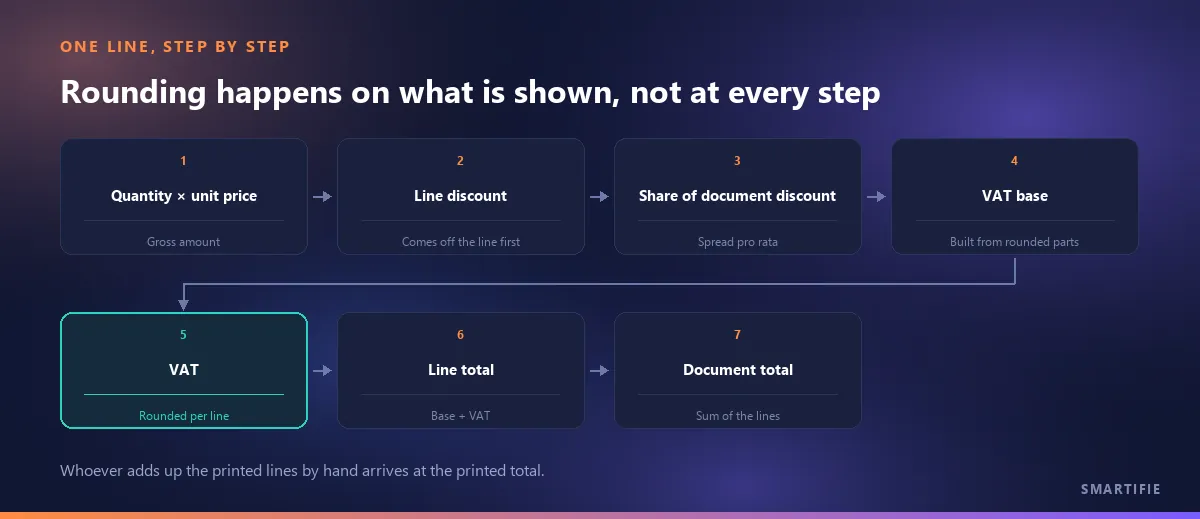
The third source is the order of discounts, and here the difference may not stay at a penny. The sound order is: line discount first, then the document discount, then the net amount, then VAT, then the total. VAT is calculated on what is left after the discounts.
Taking the document discount off after VAT, from the VAT-inclusive grand total, is a shortcut you do see in practice, and it inflates the net amount: VAT ends up calculated on the larger, pre-discount figure. The customer sees a discount, but the VAT on the document is the VAT on the undiscounted price.
If the quote has lines at different VAT rates, the document discount cannot come off as a single figure: it is unclear whose net amount it came out of, and the VAT breakdown by rate comes out wrong. The fix is to spread the document discount across the lines in proportion to their amounts. Each line takes its share; its net amount and VAT are worked out after that share comes off. The spreading itself produces a new number on every line that has to be rounded, which is one more place a penny can move.
Discounts also have an approval side: how the discount is measured against the approval limit is covered in a separate article.
Three things that make the document checkable: VAT by rate, a VAT basis note, a column heading
Once the rounding choices are made, what is left is for the customer to be able to read them off the document. Three small things make a quote checkable by hand.
- VAT broken down by rate. Under the totals, one row per rate: net amount and tax. On a quote that mixes standard-rate and reduced-rate lines, a single VAT row hides which amount was taxed at which rate. The breakdown rows should also be sums of the rounded lines, so that they add up in their own right.
- A note on the VAT basis. One sentence under the totals: “Unit prices exclude VAT.” or “Unit prices include VAT.” The same lines give one grand total when entered without VAT and another when entered with it; a document that does not say which gets added up two different ways by two different readers.
- The column heading. If the amount column just says “Amount”, some readers take it as including VAT and others as excluding it, and the two are 20% apart. A heading such as “Amount ex. VAT” lets the customer run quantity × unit price − discount on a calculator and land on the number in the column.
Laying the quote out this way also means it already looks the way the eventual invoice will have to look, so nothing new appears between the two documents.
Percentages in the payment plan: the last row takes the remainder
The last source is usually the last one anyone thinks of. Take a quote with a grand total of 1,000.01 and a payment plan of 30% / 40% / 30%. Round each percentage on its own and the plan no longer matches the grand total:
| Plan row | Exact amount | Each rounded on its own | Last row takes the remainder |
|---|---|---|---|
| 30% | 300.003 | 300.00 | 300.00 |
| 40% | 400.004 | 400.00 | 400.00 |
| 30% | 300.003 | 300.00 | 300.01 |
| Total | 1,000.01 | 1,000.00 | 1,000.01 |
Rounded row by row, the plan comes to 1,000.00; one penny is in neither the grand total nor the plan, it is simply nowhere. The fix is to calculate the last row not as a percentage but as the difference: the grand total minus the rows before it, which makes the last row 300.01. Which row absorbs the remainder is also a choice; the last row's advantage is that it is the easiest to explain, because “the balance” is already the natural name of the final payment.
The payment plan itself is not this article's subject; the payment plan and other fields on a proforma are covered separately.
If the difference reaches the invoice: rounding is stated, not hidden
A quote is not an accounting document; a penny gap on a quote is a matter of trust, not of tax. Once the accepted quote becomes an invoice, though, the difference becomes a figure that is declared. Two things are worth knowing here.
First: at the invoice stage, rounding is something tax guidance addresses openly. In the UK, HMRC's VAT manual describes a long-standing rounding concession set out in VAT Notice 700, paragraph 17.5, whose first sub-paragraph allows VAT payable to be rounded down; HMRC explains that it is aimed at traders who issue invoices, where the rounding broadly evens out because it affects both the supplier's output tax and the customer's input tax (HMRC, VATREC12010). The same manual says that if a trader proposes an alternative rounding method, it should be considered and allowed if it produces a “fair and reasonable result” (HMRC, VATREC12030).
Second: that is one tax authority's published guidance, not a universal rule. Other countries set their own, and which rule applies to your invoices is a question for your accountant, not for this article.
The practical upshot: tell whoever issues the invoices which rounding your quotes use. If the quote rounds per line and the invoice rounds on the total, the customer finds a penny between the document they accepted and the one they received, and this time the call goes to accounts.
What we do on this side, and what we do not
In Smartifie Quote the arithmetic of a quote lives in one place: what the screen shows, what the PDF prints and what gets saved all come from the same calculation. This is how we settled the decisions in this article:
- When to round: full precision is kept throughout and only the values that are shown or stored are rounded. The document's VAT is the sum of the rounded line VATs; the printed lines add up to the printed total.
- Net amount: derived from the rounded parts (gross − line discount − share of document discount) rather than rounded on its own, so the printed “gross − discount” matches the printed net.
- Direction: halves are rounded away from zero (0.005 goes up), the accounting convention that agrees with a hand calculation. Banker's rounding is not used.
- Discount order: line discount → document discount (spread across the lines pro rata) → net amount → VAT → total.
- More than one currency: each line is converted into the document currency at the rate frozen on the quote and rounded line by line; “subtotal − discounts = net” and “net + VAT = grand total” hold exactly.
- The document: a VAT breakdown by rate is printed under the totals (on by default; switch it off and VAT appears as a single row, never hidden). Every document carries the note “Unit prices exclude VAT.” or “…include VAT.”, and the Amount column states its VAT basis in its heading.
- VAT rate: a line's rate is picked from your company's list of allowed rates, which you edit for the country you invoice in; a rate outside the list is flagged and the quote cannot be saved.
- Payment plan: when the percentages are turned into amounts, the last row takes the remainder, so the plan matches the grand total to the cent.
- Currencies without cents (JPY, KRW, CLP, ISK, VND) are printed with no decimals.
It is worth being equally clear about what we do not do. The rounding method and the number of decimals are not settings; the decisions above are fixed. What you can set is whether prices are entered with or without VAT, the default VAT rate, the list of allowed rates and whether the VAT breakdown is shown. Nor do we claim a penny gap can never appear: if you work with VAT-inclusive prices, the grand total can drift a penny from the inclusive price you entered, for the reason explained above. What we do promise is that the printed lines add up to the printed total and that the VAT basis is written on the document. And the product does not produce invoices: a quote is not an accounting document, and invoicing is a separate world. The tax guidance above is context about that world, not a feature of the product.
To close, in one line: a penny gap is not a mistake, it is a choice. Make it on purpose, put it on the document, and know where the difference will show up before the phone rings.