
A salesperson wrote a 35% discount to close a big account before it walked, and hit Send. Nothing went out. Somewhere, a manager was supposed to be the one deciding whether that discount was fine — except nobody told them. Search for guidance on this and every result explains how to configure the rule: which screen, which field, which number. None of them answer the question that actually matters once the rule exists: what happens now?
The thesis in one line: an approval threshold does not answer “who signs off” — it answers “what happens while nobody has yet”. A quote that crosses the line can't be sent, sits waiting in a list, and nobody is notified; finding it is the approver's own job. That is not a missing feature, it is a deliberate product decision — the notification layer was cut from scope together with email sending — and this article says so plainly.
What the threshold is, and when it fires
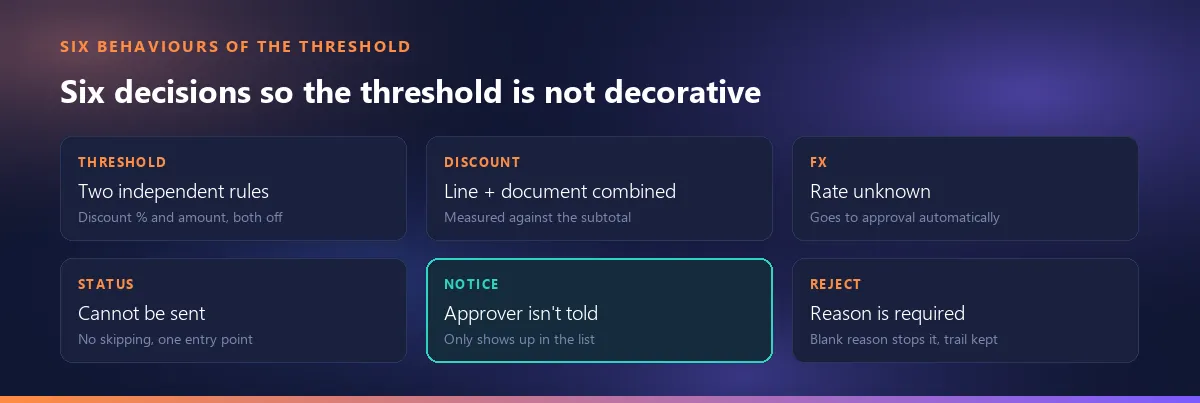
An “approval threshold” in a quoting tool is not one setting, it is two independent rules: a discount-percentage limit and an amount limit. They are measured separately, and crossing either one sends the quote to approval. More to the point: both ship off — the default value is zero, meaning no limit at all. The reasoning is a plain product principle: a tool that demands sign-off the moment it is installed gets switched off on day one. A company turns the rule on only once it has typed in its own numbers.
How the discount is measured: just the document discount?
No. The discount percentage is measured against the sum of line discounts and the document discount together, not either one alone. And the comparison is not made against the total, it is made against the subtotal before any discount. The reason for the care is easy to see: if the check only looked at the one discount box under the document, the same reduction could slip past the limit unnoticed simply by spreading it across ten lines instead of typing it into that one field. Measuring it this way closes exactly that route.
How is the amount limit measured in a different currency?
The amount limit is always defined in one currency — the company's base currency — but the quote in front of you may be priced in dollars, euros, or something else. There are two situations here.
When the rate is known
The quote's total is converted to the base currency using the rate frozen onto that quote, and the comparison runs on that converted figure. So the measurement uses the rate of the document's own day, not today's market rate — otherwise the same quote could sit under the limit one day and over it the next with nothing about it having changed.
What if the rate is unknown?
When a foreign-currency quote has no frozen rate, it goes to approval automatically — not a bug, a deliberate fail-safe: letting an unmeasurable quote through is exactly the gap where a large one would slip past unnoticed. This mechanism, together with how the rate gets frozen onto a quote in the first place, is covered in a separate article and is not repeated here: how the rate gets frozen on a foreign-currency quote.
What actually happens when a quote crosses the line: behind the Send button
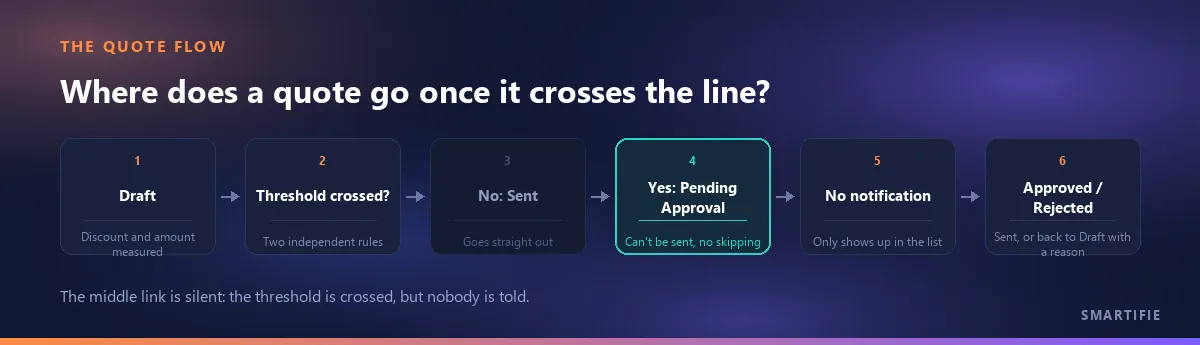
You see a “Send” button on screen and you click it. If the threshold has been crossed, the quote does not go out; its status becomes “Pending Approval”. That is not the screen's decision — a single entry point for sending checks the threshold every time, and no screen or other path around it can skip that check. The status machine keeps the same discipline: there is no direct jump from Pending Approval to Sent, and that gap is deliberately narrow — otherwise the threshold would be decorative, a warning nobody has to obey.
Is the approver notified?
No. This is the honest backbone of this article. A quote waiting for approval does not ring a bell, send an email, or push a phone notification — it only shows up in the list. That is not a gap, it is a boundary: the notification layer was cut from scope together with the decision that the product does not email quotes at all. Which means who notices a waiting quote, and when, depends entirely on somebody's habit of looking at that list.
So how is it noticed? Tracking it in practice
There is no badge or counter on the dashboard — no card that opens saying “3 quotes waiting for approval”. The way to find them is to set the status filter on the quote list to Pending Approval. In a small team this turns into a habit somebody folds into their morning or end-of-day routine: open the filter, scan the list, check nothing is sitting there. It is not something the software does for you — it is a discipline a team builds, which is exactly why turning the threshold on should be a decision made with eyes open.
It may be easier to see this behaviour in a real tool: a quote tool where you set your own approval limits.
What happens when it's approved — or rejected?
When it is approved, the quote takes the direct route: its status moves straight to Sent, no separate “now send it” step required. Rejection works differently, and one rule here is strict: a rejection with no reason is not allowed. Trying to reject with a blank reason stops the action cold. The reasoning is plain: a reason-less rejection tells the author nothing to change, and the quote comes back untouched — which is exactly how an approval step stops being used over time. Once a reason is entered, the quote returns to Draft and its author can keep working on it.
Worth keeping separate here: a quote's validity running out is a completely different stage of its life from the approval threshold — one is the internal check before sending, the other is about a customer going quiet after it was sent. Trying to cover both in one article would blur each of them.
Does any of this leave a trail?
Yes. Submitted for approval, approved, rejected — every transition is appended to an event log that is never erased, with who did it and when. The reason is simple: “who approved that large discount” usually gets asked months after the fact, in a dispute or an audit, and at that point the current status alone (“Sent”) cannot answer it. The status field says where a quote is right now; only this log says how it got there.
What we do on this side, and what we do not
In Smartifie Quote, the approval threshold works exactly as described above: two independent rules (discount percentage, amount), both off by default; the line and document discounts are measured together; a foreign-currency quote with no known rate goes to approval automatically; there is no jump from Pending Approval straight to Sent; a rejection requires a reason; every transition is appended to an event log that is never erased. What we deliberately do not do: we do not email or notify anybody about a quote waiting for approval — a boundary taken together with the decision that the product does not email quotes at all. There is no approval badge on the dashboard either; waiting quotes are found through the status filter.
To close, in one line: the threshold stops the quote, it does not warn anybody — in this tool, checking the waiting list regularly is the only substitute for a notification.