
A customer calls: “I have a question about your quote 42.” If your branches share one counter, there is only one quote 42, but the number doesn't tell you which branch wrote it. If each branch keeps its own counter, there are two of them, and the only way to say which one is the branch code. Every sales team with more than one branch, store or regional office makes this decision at some point, often without noticing, by ticking a box on a settings screen. This article is about that decision: when one counter is right and when one per branch is; how to pick a branch code; what happens to a quote saved without a branch; and what a month or fixed text in the number does to the counter.
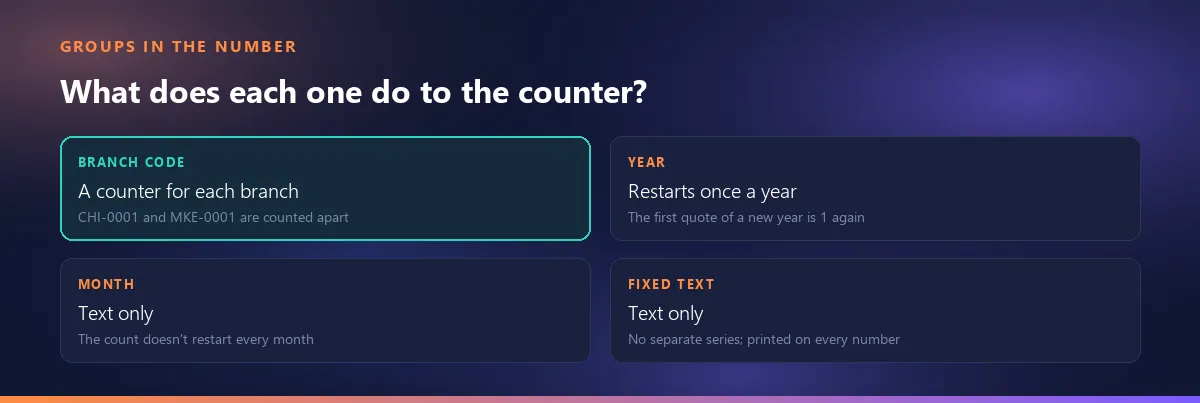
The short answer: adding a branch code to the number is not a display choice, it is a counter choice. Each branch keeps its own series, “quote 42” is now always said together with the branch code, and the code never changes again. A month or fixed text, on the other hand, is only text; neither one splits the counter.
One counter or one per branch: start with who reads the number
Three parties read a quote number: the customer who receives the quote, the branch that prepares it, and the head office that adds up the figures. Whichever of them matters most decides how the counter is set up.
| Situation | One counter | One per branch |
|---|---|---|
| Who prepares the quotes? | One central sales desk | Each branch, for its own customers |
| Customers | Branches sell to the same customers | Each branch has its own customer base |
| Files and follow-up | Kept in one place | The branch manager follows the branch's own series |
| Head office's question | “How many quotes did we send this year?” read from one number | The total is the sum of the branch series |
The mechanics in one sentence: on a shared counter every branch draws from the same sequence, so a single branch sees gaps between its own quotes. We explained why branch numbers jump on a shared counter in a separate article.
No law makes this decision for you. A quote is not a tax document; how its number looks and how many counters issue it is up to your needs, not to regulation. Whether a quote number is a legal requirement at all is covered in the same article.
With a counter per branch, there are two “quote 42”s
Can two branches use the same quote number? As far as the sequence at the end goes, yes: with a counter per branch, both branches reach their 42nd quote of the year, and both end in 0042. The full number doesn't collide, because the branch code in the middle is different: Q-26-CHI-0042 and Q-26-MKE-0042.
In practice this comes down to one habit: the number is always given in full, on the phone, in emails and in file names. Not “could you send 42?” but “CHI 42”. If you don't tell the sales team this up front, the first call where the wrong quote is opened will.
In Smartifie Quote the only way to split the counter by branch is to print the branch code in the number: in Settings → Numbering, answer Any other group? with Branch code. There is no hidden per-branch counter without the code, so two branches' full numbers don't collide. That is also why the “last number issued” line disappears from the settings screen once the branch group is added: there is no single last number any more, each branch has its own.
The branch code is printed into the number for good: how to choose it
How many letters should a branch code have? Few: 2 to 5 characters, letters and digits, an abbreviation everyone recognises. A city abbreviation, an airport code or the first letters of the name the branch is known by all work well. Avoid sequence codes such as “BRANCH1” or “BRN-0004”: customers and accounting can't tell which branch it is from the number, and once the first branch closes, “1” means nothing. Don't repeat the prefix in the code (the prefix is already at the start of the number). Keep it to plain letters without accents or symbols, so the number survives intact when it is typed into a customer's system, a file name or a payment reference.
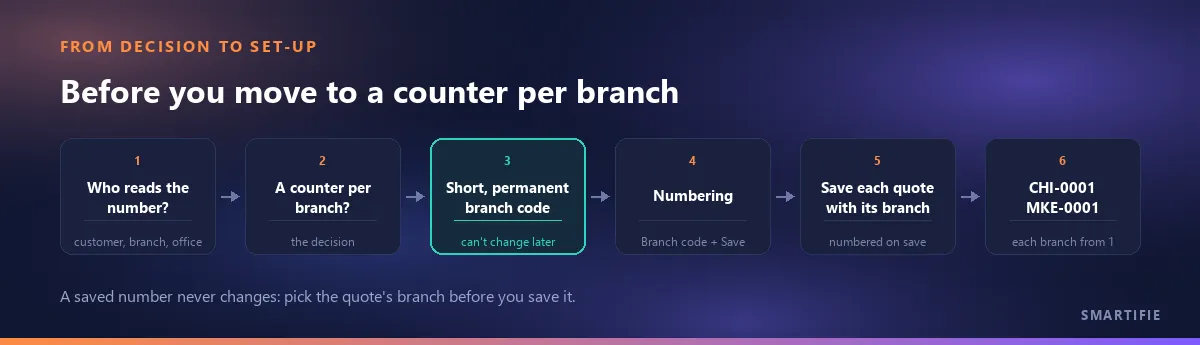
Why so much care? Because the code can't be taken back. In Smartifie Quote, under the code field on the Branches screen, it says: “Short and readable — it appears on the documents this branch issues. It cannot be changed later.” Once the branch is saved, the code field is locked. When you close a branch it is made inactive, not erased, and its code stays in the numbers of its old quotes. So the code is thought through before the branch's first quote, not after.
Avoid long codes too. The number doesn't stay on your screen; it is typed into the customer's purchasing system, a file name, a payment reference. Every extra letter is one more chance of it being cut off or mistyped somewhere along the way.
Where does a quote saved without a branch go?
You have moved to a counter per branch, but someone saves a quote without choosing a branch. In Smartifie Quote that quote is numbered without a branch code (no dangling separator is left in the number) and continues from the shared counter used before the split by branch. The result: two kinds of number sit side by side in the same year, those with a branch code and those without. A number without a branch belongs to no branch's series, and no branch manager will look for it in their list.
The advice is simple: once you have a counter per branch, every quote is saved with its branch; make that a team rule. For a user who works for a single branch, the quote screen picks that branch on its own, so there is no field to forget.
One warning: the number is given on the first save and never changes after that. If you later change the branch of a saved quote, the number keeps the first branch's code; the quote is not renumbered. Choose the branch before you save.
Adding the month doesn't restart the count every month
If the number contains the month, does the count start again every month? People ask this from both directions: some want the first quote of each month to be 1, others want the month visible in the number but the count left alone. Adding the month without knowing which one you want leads to a surprise on the first quote of the second month.
In Smartifie Quote the month is text only: it is printed into the number as two digits and plays no part in the counter. With a year stamp the counter is yearly; without one it simply keeps going. So Q-26-11-0137 doesn't mean “November's 137th quote”, it means “the year's 137th quote, written in November”.
The advice: don't use the month without the year. The month repeats every year, and an “11” without a year doesn't say which November it was. If you want to know how many quotes went out each month, read that from the quote date, not from the number: filtering the quote list by a date range is enough.
Fixed text doesn't open a separate series
If I put “EXP” on export quotes, do they get their own numbering? No. In Smartifie Quote fixed text is printed the same way on every number of that document type and plays no part in the counter. The product opens the text box with “EXP”, but that is only an example: typing EXP doesn't separate export quotes from domestic ones, it puts EXP on all of your quotes.
Fixed text makes sense when you want to tell your numbers apart from numbers coming from somewhere else; most of the time the prefix already does that job. Read the kind of quote (export or domestic) from the quote itself, not from its number: the customer, the currency and the terms already say it.
How many digits a branch counter needs, and why the increment should stay at 1
With a counter per branch and per year, each series is smaller. For a branch writing fewer than a thousand quotes a year, 4 digits are enough. In Smartifie Quote the number length can be 3, 4, 5, 6, 7, 8 or 10 digits. The rule is simple: take the number of digits in a branch's yearly quote count and add one. A branch writing 300 quotes a year gets 4 digits; one writing 3,000 gets 5.
The increment can be set to 2, 5, 10 or 100, but the first number is always 1: with an increment of 10 the sequence goes 1, 11, 21. Every deliberate gap eventually makes someone ask “where are the quotes in between, are they missing?”. The advice: keep the increment at 1. In Smartifie Quote a number is only given when the quote is saved, so an abandoned draft doesn't use one up.
After the decision: the format changes, old quotes don't
In the video, Lakeshore Kitchen Equipment has one quote so far: QUO-2026-000001, numbered in the recommended shape. In Settings → Numbering we add the branch code group first, then pick our own prefix Q, a two-digit year and a 4-digit number; we add the month group, remove it and save. We open a second branch with the code MKE. Then three quotes: Chicago gets Q-26-CHI-0001, Milwaukee starts its own count at Q-26-MKE-0001, and Chicago's next quote is Q-26-CHI-0002. The companies and data in the video are fictional.
Watch how it works
Real screens, start to finish.

Quote Number Format: Prefix, Year and Branch Code | Smartifie Quote
How to set up your quote number format in Smartifie Quote: nothing changes until you save, a branch code gives every branch its own counter, and existing quotes keep their numbers.
The video loads from YouTube when you press play.
The quote list at the end of the video is the real proof here: the format changed, but the first quote still carries its old number.

Changing the format doesn't change old numbers, and the new branch series start at 1. That makes the start of the year the cleanest moment to switch: the year stamp restarts the counter anyway, and the whole year's quotes stay in one format. For the mechanics, see why changing the format doesn't reset the counter.
What Smartifie Quote does here:
- A prefix (the default, your own, or none), a 2- or 4-digit year, the number length, the increment and the separator.
- Branch code (a counter for each branch), month and fixed text groups.
- A live preview until you save; an unsaved choice affects no number.
- Separate formats and separate counters for quotes and proformas.
- The number is given only on save; the “Back to the recommended shape” button restores the format without resetting the counter.
And, just as plainly, what it doesn't do:
- No typing a number by hand or correcting it later; no resetting the counter or choosing a starting number: the first number is always 1.
- No monthly counter, and no separate series from fixed text.
- A saved branch's code can't be changed.
- It doesn't issue order numbers; the order format is only kept ready on the Numbering screen.
- It doesn't issue invoices: a quote and a proforma are not tax documents, and their numbers are not invoice numbers.
To close, in one line: first decide who reads the number; if you move to a counter per branch, pick a short, permanent code, save every quote with its branch, and treat the month and fixed text as text only.
If you'd like to try it with your own branches: a quoting tool that can keep a separate counter for each branch. The cloud edition comes with a 15-day free trial.