
The buyer is setting up the payment and asks for one more thing on your quote: the total spelled out in words. Search for it and you get number-to-words widgets, accounting add-ons and forum threads. What you don't get is an answer written for a sales desk: does a quote need the amount in words, what happens if the words and the figure disagree, and if you do spell it out, how? That is what this article covers.
The short answer: on a quote, the amount in words is a habit carried over from checks and promissory notes, not a requirement. If you spell it out, there is one rule: the words must be derived from the figure. Words typed by hand turn a mismatch into a document where nobody knows which side wins.
$12,450 in figures, “twelve thousand four hundred five” in words: which did the customer accept?
An invented but familiar case. The first version of the quote totals $12,405.00, and the seller types “Twelve thousand four hundred five dollars” underneath. The customer changes a quantity and the revised quote now totals $12,450.00. The line underneath stays exactly as it was copied from the template. The customer accepts. Accepts what, exactly? The seller reads the figure; the buyer's accounts payable reads the words. Here the gap is $45, but a slipped zero (124,500 against 12,450) arrives by the same road, just as easily.
Written correctly, the line looks like this: 1,234.50 USD → “One thousand two hundred thirty-four US dollars and fifty cents”. When it is right, nobody looks twice. The trouble starts when the line is not updated at the same moment as the figure, and the rest of this article is about that moment.
Where the habit comes from: checks, notes and invoices
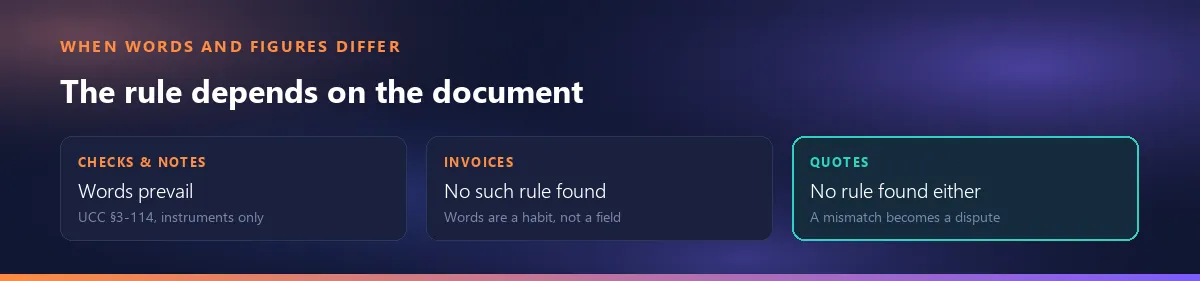
Checks and notes. Article 3 of the Uniform Commercial Code, which most states have adopted, settles conflicts inside a negotiable instrument in one sentence (§3-114): “If an instrument contains contradictory terms, typewritten terms prevail over printed terms, handwritten terms prevail over both, and words prevail over numbers.” (UCC §3-114, Cornell LII; North Carolina's enacted version, for example, is G.S. 25-3-114). That is why check writers learn to spell out the amount and add the cents as a fraction: “… and 52/100”.
Invoices. We found no federal or state rule that requires an invoice, let alone a quote, to show the total in words. That is a finding from our search, not a guarantee that no such rule exists anywhere; but the habit on American documents clearly comes from check writing, not from invoicing law.
A quote is not a check: the rule does not carry over by itself
Section 3-114 applies to an instrument, and Article 3 defines what that is in §3-104: a negotiable instrument, essentially an unconditional promise or order to pay a fixed amount of money, such as a check or a promissory note. A sales quote is not that; it is the seller's proposal of goods and prices. So “words prevail over numbers” does not settle a quote by itself. If the words and the figure on a quote disagree, the question becomes what the parties meant, and nobody can tell you in advance which way that will go. Treating the words as a safety net is as misplaced as treating them as decoration.
Public bids are a separate world: the solicitation and the bid form decide. This article is about commercial quotes.
This is not legal advice; for a concrete dispute, talk to your attorney.
The real risk is not missing words but words that don't match
A quote with no words has one figure, and everyone who reads it sees the same number. The risk appears when the words live somewhere other than the figure. There are three moments when hand-typed words drift away from it:
- The revision. A price or a quantity changes, the grand total recalculates, and nobody remembers the words underneath. How to keep track of revisions is a separate topic; see editing a quote after it has been sent.
- Copy and paste. A new quote starts from an old one or from a template; the lines change, and the spelled-out total still carries the previous customer's amount.
- Rounding. If the words are written from the raw figure on a calculator (say 1,234.495), they can part ways with the rounded figure the document prints by a cent. How rounding moves the total has its own article.
All three have the same root: the words and the figure come from two different sources. Make it one source and the mismatch has nowhere to come from.
If you spell it out: three rules
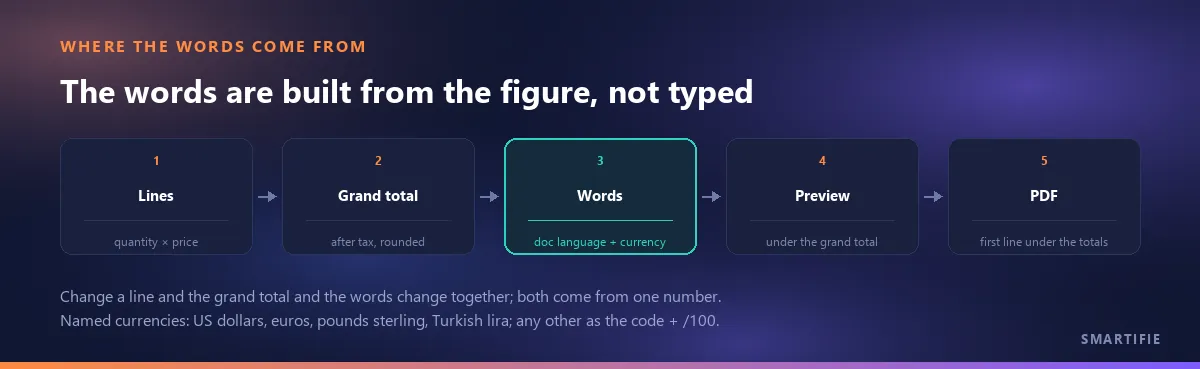
- Derive the words from the figure. No separate field typed by hand; when the figure changes, the words change with it.
- From the grand total, with the printed rounding. Not the subtotal but what the customer pays: the grand total after discount and tax, to the cent the document prints. The document should also say what that total includes: whether the total includes tax.
- In the document's language, with the currency's name. “… US dollars and … cents” on an English document, “… euros con … céntimos” on a Spanish one, “… Türk lirası … kuruş” on a Turkish one. For a currency you can't name, the check-writing convention works: the code, with the cents as a fraction (“Ten AED and 25/100”).
Dollars and cents, or 52/100?
Both are common. Checks usually write the cents as a fraction (“One thousand two hundred thirty-four and 50/100 dollars”); typeset documents more often name them (“… and fifty cents”). Neither is required on a quote as far as we found. Pick one, use it on every document, and hyphenate the compound numbers (“thirty-four”).
If the quote may become the contract: say which one governs
If the law sets no tiebreaker for a quote, the document itself can. One sentence in the quote's terms says in advance which one governs if they ever differ. For example:
“If the amount in words and the amount in figures on this quote differ, the grand total in figures governs.”
Which one you pick is your call; if your words are generated from the figure, choosing the figure is the natural option, because that is where the words come from. This sentence is a suggestion, not legal advice and not a standard clause; on a large or long-running deal, have your attorney read it.
When to turn it on, and when it's noise
- Good reasons to turn it on: proformas and export deals (the buyer's bank reads the documents line by line), customers who pay by check, institutional or public bids whose forms ask for the amount in words, and buyers who simply ask for it.
- Where it is noise: small one-line quotes, retail and quick price checks. There the line only adds clutter.
For the rest of that decision on an export proforma, see what to include in an export proforma invoice. In Smartifie Quote this is a company setting, so you make the call once for your customer base rather than on every quote.
In Smartifie Quote: “Amount in words” is one setting
The video shows it on screen: a fictional quote for a hotel group, two lines, and the words appearing under the grand total on their own. The steps:
Watch how it works
Real screens, start to finish.

Amount in Words on a Quote: Do You Need It? | Smartifie Quote
Amount in words on a quote: more a habit than a requirement, and the real risk is words that disagree with the figure. How Smartifie Quote prints the grand total in words from the figure itself, in the document's language.
The video loads from YouTube when you press play.
- The setting: Settings → group Document → Amount in words. It is Off by default; choosing On saves at once (there is no save button) and the row shows a changed badge. It is a company setting, not something you switch per quote.
- Where it prints: in the preview, right under the Grand total and before the tax note: “Amount in words: …”. In the PDF it is the first line of the small print under the totals. On the quote in the video: 5,043.84 USD → “Amount in words: Five thousand forty-three US dollars and eighty-four cents”.
- The source: the words are built from the grand total, after discount and tax, in the quote's currency and rounded exactly like the printed figure. Change a line's quantity and the figure and the words change together; they cannot drift apart.
- Language: the label and the words follow the document's language, not the screen's. Set Document language to Español and the line reads “Son: …”; set it to Türkçe and it reads “Yalnız: …”, while the screen stays in English.
- The same line everywhere: on the quote, on the proforma and on the customer's approval page. If you changed the setting in another tab, refresh the editor's preview with ↻ Apply latest changes.
And the limits. Four currencies are written out by name: US dollars, euros, pounds sterling and Turkish lira. Any other currency is written with its code and the cents as a fraction (“Ten AED and 25/100”); currencies with no minor unit, such as JPY, get no fraction. On document languages other than English, Spanish and Turkish the words are written in English. And Smartifie Quote does not issue invoices: a quote and a proforma are not tax documents; what the product does is make sure the figure and the words on a quote say the same thing.
To close, in one line: a quote doesn't need the amount in words; if yours has it, derive it from the figure.