
The customer says they'll sign today if you can do a little better on price. Your rep takes the discount to 20% and the quote goes out. A few days later someone asks who agreed to that discount and how much margin was left. Usually the answers are “nobody” and “we're not sure”. The fix is well known: a quote above a certain discount goes to a second person before it reaches the customer. The hard part isn't switching that rule on, it's picking the number. What percentage, should the amount count too, and who signs off? That decision is what this article is about.
The short answer: there is no right “industry discount limit”; the right number is worked back from your gross margin. And in a small team, one percentage plus, if you need it, one amount threshold does more good than the three-tier approval matrices big companies use.
Why there is no ready-made answer to “how much can I discount?”
Search for this and most of what comes back is vendor glossaries and enterprise sales guides. They tend to offer a three- or four-tier table: reps up to one percentage, managers up to a higher one, leadership above that. Those tables were built for large sales teams with their own margin structures. Copying their percentages into your company is like adopting someone else's budget for your own costs.
What sets the number is your margin. The same 15% discount means very different things on two products. On a product with a 60% margin on list price, 15% off takes a quarter of the gross profit and leaves the margin around 53%. On a product with a 20% margin, the same discount takes three quarters of the gross profit and leaves about 6%. A discount that is easy to give on one product makes the other sale almost profitless. So the starting point should be your own numbers, not somebody's table.
Percentage or amount: two limits catch two different risks
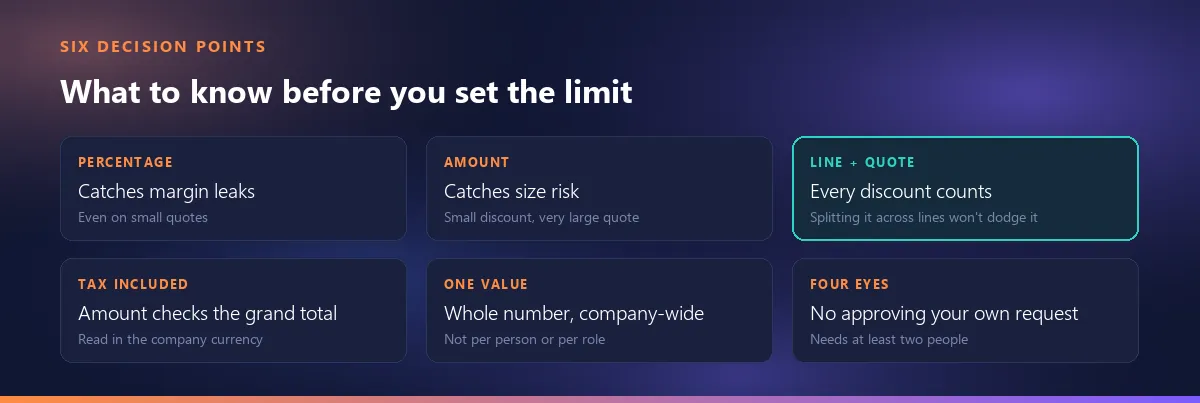
A discount limit can look at two things, and each answers a different question. A percentage limit catches margin leaks: even on a small quote, a discount that pushes your margin below the floor stops before it reaches the customer. An amount limit catches size risk: a quote with a modest discount but an unusually large total, the kind that commits your capacity, your delivery schedule or your payment risk, and that one person shouldn't commit to alone.
In Smartifie Quote these are two separate fields in Settings → Approvals: “Discount that needs approval (%)” and “Amount that needs approval”. They work independently, and whichever one is crossed sends the quote for approval instead of to the customer. Both start at 0, which means no limit. You can turn on just one or use both. The video shows step by step where the setting is and how a quote above the limit ends up waiting for approval.
Watch how it works
Real screens, start to finish.

Discount Approval: Send Big Discounts to a Manager | Smartifie Quote
How to set a discount approval limit in Smartifie Quote, so a quote above it goes to a manager for approval instead of to the customer.
The video loads from YouTube when you press play.
Work the percentage out from your margin
You need two numbers. The first is m: your gross margin on the list price, that is (list price − cost) ÷ list price. The second is f: the lowest margin you'll accept on a sale, the floor below which you'd rather not take the deal on those terms. The largest discount a rep can give without asking anyone is then:
d = (m − f) ÷ (1 − f)
Example: with a 35% margin and a 25% floor, d = 0.10 ÷ 0.75 ≈ 13.3%. The field takes whole numbers, so round down and enter 13. Check it: on a $100 list price with a $65 cost, 13% off brings the price to $87, the margin is 22 ÷ 87 ≈ 25.3%, and the floor holds. Looking at it the other way makes the point too: at a 35% margin, 15% off leaves about 23.5%, and 20% off leaves 18.75%.
The most common mistake is to use markup on cost instead of margin on list price. A product you buy at $65 and list at $100 has a 54% markup but a 35% margin. Put 54 into the formula and the limit comes out at 38, which lets a rep give away almost all of the margin without asking. The formula works with margin on list price.
| Margin on list price (m) | Limit with a 20% floor | Limit with a 25% floor |
|---|---|---|
| 30% | 12 | 6 |
| 35% | 18 | 13 |
| 40% | 25 | 20 |
| 50% | 37 | 33 |
Values come from the formula, rounded down to a whole number. The figures are an example; use your own margin and floor.

If your product groups have different margins
The limit is one company-wide value; there's no separate limit per product group, per person or per role. So among the products where discounts actually get negotiated, base it on the lowest-margin group. The cost is clear: quotes on high-margin products will go for approval more often than strictly needed. That is cheaper than quietly selling a low-margin product at a loss.
One more detail: the limit looks at the quote as a whole, not line by line. A quote with a big discount on one item and none on the rest can stay under the limit overall. When you pick the number, think “at most this much off a whole quote”, not “at most this much off any single line”.
It doesn't matter whether the discount sits on a line or on the quote
The limit adds up every discount on the quote, on the lines and on the document, and compares it with the subtotal before discount. Moving a discount from the quote-level box onto the lines won't get it past the limit. The test is “greater than”: with a 15% limit, exactly 15% goes through without approval and 15.01% goes for approval. In the video the limit is 15%; when the discount on the fryers goes from 5% to 20%, the quote's total discount comes to almost 16% of the subtotal and the quote goes for approval. What counts is the share of the whole quote, not the 20% on that one line.
The details of the measurement, and what happens once a quote crosses the line, are covered separately: what happens to a quote stuck in approval.
What should the amount threshold be?
The amount threshold belongs above your typical quote, at the point where you'd say “one person shouldn't commit us to a deal this size alone”. Our own suggestion (not a statistic): sort the last few months of quotes by grand total and look at where the handful of large ones begin. Set the threshold there and it comes into play on the genuinely big deals, not every day.
Two details change the number. First, the threshold checks the tax-inclusive grand total. If your quotes carry sales tax, the limit sees the figure at the bottom of the quote, tax and all, so set it on that figure rather than on the pre-tax amount. Second, the threshold is read in the company currency, and entering the first amount threshold also fixes the company currency. The field takes whole numbers. A quote in another currency is converted to the company currency at the rate frozen onto that quote; if there is no rate, the quote can't be measured and goes for approval. More on which exchange rate goes on a foreign-currency quote.
One level of approval, or several?
Enterprise guides usually recommend three or four levels: reps up to a point, then a manager, then someone above the manager. In a sales organization of hundreds, that makes sense. In a team of 3 to 15 people, every level is one more approver and one more wait, and if anyone in the chain is on vacation, the quote waits too. What a small team really needs is simple: a big discount gets looked at by someone other than the person who gave it.
Smartifie Quote works with a single level: any quote above the limit can be approved by anyone who holds the approval permission. To be plain about it:
- There's no tiered approval chain; you can't set up “manager up to 20%, director above that”.
- There are no limits per person or per role; the limit is one company-wide value.
- No decimals in the percentage: 12 or 13, not 12.5.
- Nobody is emailed or notified when a quote is waiting for approval; waiting quotes are found in the list with the “Awaiting approval” status filter.
If you genuinely need a tiered chain, this tool isn't the right fit, and it's better to know that now than to find out later. If one threshold and a second pair of eyes is enough, take a look at a quoting tool where you set your own discount and amount limits.
Who should approve, and who can't?
The point of approval is that someone other than the person who gave the discount looks at it. So the rules are plain: whoever sends a quote for approval can't approve their own request; if they try, the screen says so and asks for someone else. The permission is granted through a role on the smartifie.com Team page (“Approve quotes (discount / amount limits)”); the license owner and admins can approve as well.
It follows that the limits only become available once the Quote license has at least two people and at least one Quote role is defined on the Team page. On a one-person account the Approvals group shows as locked, because a limit nobody can clear only stops the quote.
Who gets the permission is a decision too. Hand it to the whole sales team and reps end up approving each other's quotes, and the second pair of eyes turns into a formality. One or two people is enough, ideally people who will make a habit of checking the waiting list every day, since nothing notifies them. When a quote is sent back, a reason is required: a line like “the discount is above the limit, bring it down to 15%” tells the rep what to change.
The first month: how do you know the limit is right?
The formula gives you a starting point; the first few weeks tell you whether the limit is right. What follows is our own suggestion, not a measured result:
- If most quotes go for approval, the limit is too low. Approval becomes routine, the approver starts clicking through without reading, and the limit stops doing its job. Revisit either the margin calculation or the floor.
- If no quote ever goes for approval, the limit is either too high or not needed right now. The second is a fair outcome: if your team is already disciplined, the limit is just there to catch the exception.
- Read the send-back reasons. If the same one keeps coming up (“bring it down to 15%”), the reps don't know the limit; telling them once is cheaper than sending back every quote.
- Check the history. Each quote's history shows which account asked for approval, which one approved or sent it back, and when. The answer to “who agreed to that discount?” is there.
If you change the limit, change it once and for a reason, not every week. A limit that moves every month never sticks in anyone's head.
To close, in one line: work your discount limit out from your margin, not from your industry, and in a small team one threshold and a second pair of eyes is enough. How a quote waits, gets found and gets resolved once it has crossed the line is covered in what happens to a quote stuck in approval.