
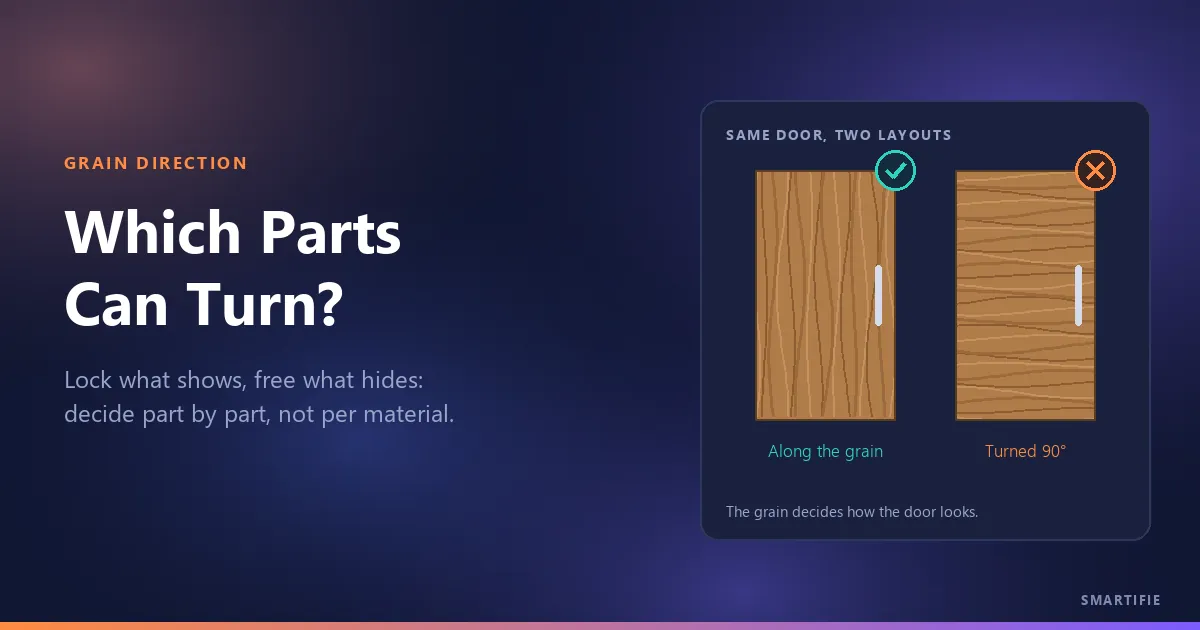
You are cutting a kitchen out of white oak plywood. To save material, the optimizer has laid one door on its side: it fits the sheet better, but once it is hung, its grain runs across while the doors next to it run up and down. The opposite happens too: you lock every part on the list “because grain matters”, the backs and drawer bottoms get pinned to one direction as well, and you open an extra sheet. Grain direction is not one question; it is a small question you ask about each part. Most of what you find online is scattered across forum threads. This article puts the decision in one place: which parts to lock, which to leave free, and what each lock costs.
The short answer: grain direction is a decision about looks (and, in plywood, partly about stiffness). Lock what shows, free what hides; every unnecessary lock takes away layout room you could have won from the sheet. So the decision is made part by part, not once for the whole material.
What is grain direction, and which way does it run on a sheet?
On a decor panel such as a wood-grain melamine, the grain is the direction of the printed pattern. On plywood and real-veneer panels it is the direction of the face veneer's fibers. For cutting, both come down to one question: which way does the part come off the sheet? Turn the part 90° and you turn its grain 90° too; a rotation on the layout is a rotation you will see on the finished cabinet.
On most plywood the face grain runs along the long side of the sheet; one supplier sums it up for its own panels as “the grain follows the bigger number” (Plyco). But that is not a universal rule. The order in which a sheet size is written varies from supplier to supplier, and some decors run across the sheet on purpose. The only safe habit is to confirm the grain direction from the catalog or the sheet label and draw an arrow on the sheet before the first cut.
Which sheets have no grain at all?
Solid-color and white melamine, raw MDF, sheet metal and glass carry no direction: however you turn a part, it looks the same, so every part can rotate. On white melamine you do not need to worry about grain at all; give the layout the freedom to turn every part.
The in-between case is a solid color with a directional texture: brushed, linen or textile finishes. There is no pattern, but when the light hits the surface from one side, the texture shows. Check the supplier's decor card for whether the surface is directional; if in doubt, hold two sample pieces side by side under the light, one turned 90°. If you can see a difference, treat that sheet as if it had grain. Bars and extrusions skip this decision entirely: the part is cut along the bar's length, so there is no direction left to turn.
Visible parts: doors, drawer fronts, finished ends, tops
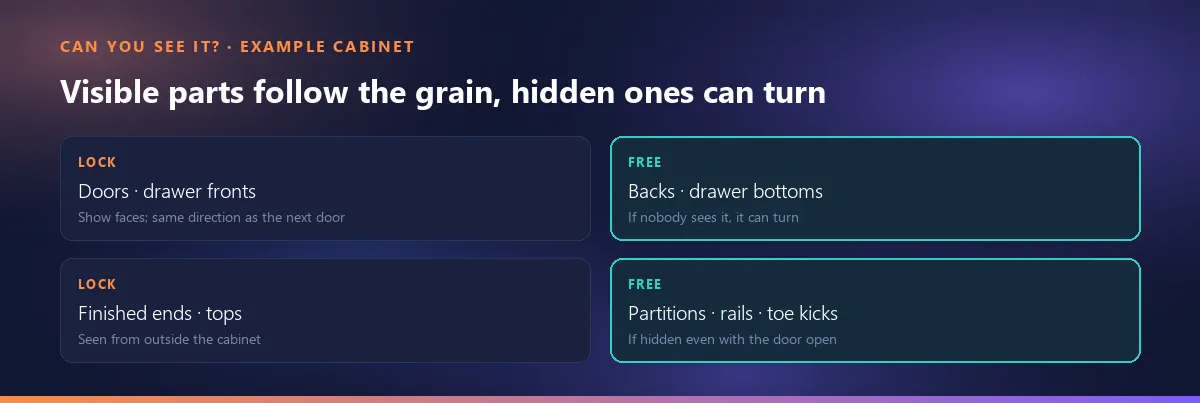
On visible faces the rule is consistency: every part seen from outside the cabinet is cut the same way. On doors and finished ends, the common practice is vertical grain. Drawer fronts are a design call; some jobs run the grain vertically so a stack of fronts reads as one panel, others run it horizontally. What matters is that every front in a cabinet, and across a run of cabinets, follows the same rule. If you want the pattern to carry from one door to the next, try to cut those doors from the same sheet, in the same direction.
Horizontal grain on a finished end is the one that stands out most. In a cabinetmakers' forum digest, most participants say the same: if it is on the outside of the cabinet, “it would be very noticeable”; one adds that rotating a visible part is only acceptable if the customer signs off on it (WOODWEB knowledge base). On long visible parts such as tops and open shelves, the grain usually runs along the part's length.
Hidden parts: backs, drawer bottoms, partitions, rails, toe kicks
Leave free the parts nobody will see: backs, drawer bottoms and drawer box sides, partitions, rails, toe kicks and the hidden sides of a corner cabinet. Being able to sit either way on the sheet lets these parts fill the gaps between the visible ones. In the same forum digest, cabinetmakers describe sending leftover sheets to exactly these parts: drawer boxes, toe kicks, backs. On a job that will be painted or covered later, grain matters even less.
There is one condition: is the part really hidden? On an open shelf unit the inside of the side shows, in a glass-door cabinet the whole interior shows, and the moment a door opens the inner faces are on display. So the question is not “can you see it from outside?” but “can you see it with the door open?” If the answer is yes, treat that part as visible.
Shelves: looks or strength?
The shelf is the part where the grain question does not boil down to one answer. The usual advice for plywood shelves is to run the face grain along the span, from one side to the other. But the sources disagree: in modern plywood with thin face veneers, which plies carry the stiffness can vary from panel to panel, and how much a shelf sags is usually set more by thickness, span and load than by grain. We do not settle that here: if strength matters, check the panel maker's span or load table, and decide the grain by looks.
On wood-grain melamine and laminate panels the grain is only a print; we found no source saying the direction of the pattern changes how strong a shelf is. On those panels the shelf decision is purely about looks: lock it like a visible part if it is an open shelf, and feel free to let it turn if it sits behind a door.
What a lock costs: every lock narrows the layout
A part that can rotate gets tried both ways on the sheet; a part locked to the grain sits one way only. A single lock rarely makes a difference. But when most of the list is locked, the layout has fewer options, and the result is either one more sheet or narrower, harder-to-use offcuts. There is no general percentage for how much that costs; it depends on the part sizes, the sheet size and how much of the list is locked. All that can be said is the direction: every unnecessary lock takes away a layout you could have had.
The way to measure it on your own job is simple: run the same list twice and compare the sheet count. In the free cut list optimizer, the “Parts may be rotated 90°” box applies to the whole list at once: run it once unticked (everything locked) and once ticked (nothing locked). Because the tool does not know grain per part, it gives you the two ends; the real job, with only the visible parts locked, lands somewhere in between. If the gap is less than a sheet, your locks are cheap; if it is several sheets, go back to the list and look again at which parts really need to be locked. When the sheet count comes out the same, comparing the two plans means working out the waste percentage properly; we cover what counts as waste in that article.
The counter-view deserves a mention too: rotating does not always pay. In the same forum digest, one cabinetmaker works through an example showing that the standard layout was chosen for yield in the first place, and that a rotated layout can leave a less usable offcut for the same number of sheets. When you compare the two runs, look not only at the sheet count but at whether the leftover will be any use on the next job.
Where the rule belongs: on the material, the sheet or the part
The grain decision lives on three layers, and each answers a different question. Material: does this panel have grain at all? Sheet: which way does the grain run on this sheet, along it or across it? Part: will anyone see this part, so should it follow the grain? Putting the rule on the material alone is the easiest option and the most expensive one: every part cut from it, backs and drawer bottoms included, gets locked. The single box in the free tool works exactly that way. Putting the rule on the part ties the decision to looks: the lock sits only where it is needed.
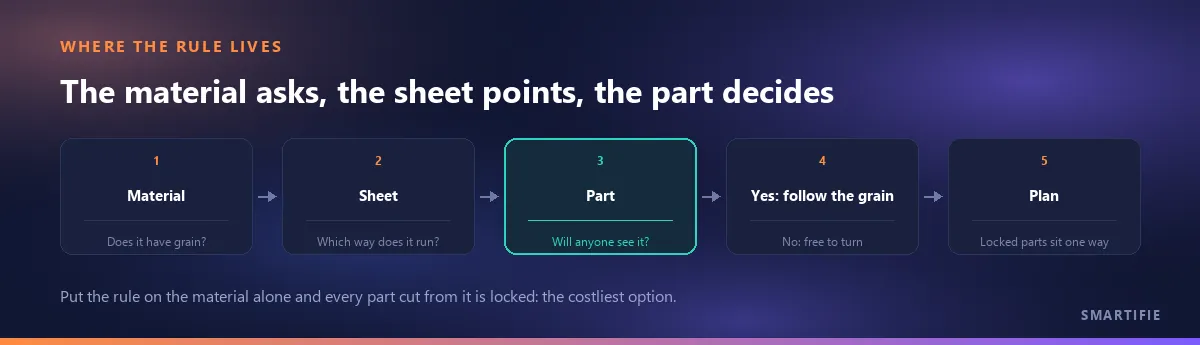
Smartifie Cut, a cutting planner that tracks grain part by part, keeps these three layers apart. On the material you tick “Has grain”; on its own, that locks nothing. The grain direction is set in stock, on each sheet (“Along the length” or “Along the width”); if no direction is chosen, the grain is taken to run along the sheet's length. In the job's part table, only the parts marked “Follow the grain” are pinned: the part's length is laid along the sheet's grain and the part is never turned. The app's own help text suggests it for visible faces such as doors and fronts. Unmarked parts that are allowed to rotate can still turn; on a material without grain, every rotatable part turns. The full set of material rules is in the guide's material rules section.
You can watch how a material's rules (kerf, trims, grain) are entered once in Smartifie Cut, and how every job that names that material inherits them, in the video below. The materials, codes and values in it are fictional example data for a sample shop.
Watch how it works
Real screens, start to finish.

Cut List Optimizer Setup: Kerf, Trims and Grain | Smartifie Cut
How to set up a material once in Smartifie Cut so every cutting plan follows your saw: kerf, leading, trailing and side trims, the smallest offcut worth keeping, grain, and guillotine cuts only.
The video loads from YouTube when you press play.
Sending the list out for cutting: one rule
If you send the list to a cutting service or a panel supplier, there is one rule: mark the grain direction on the list explicitly, or follow the dimension order on the supplier's form to the letter. Do not assume “the first dimension is the grain direction” without written confirmation from the supplier; the dimension order and the marking habit change from shop to shop. Go to the saw with a plan that marks which parts follow the grain.
A five-question check before you cut:
- Which way does the sheet's grain run? Did you confirm it from the catalog or label, and draw an arrow on the sheet?
- Does the sheet really have a direction? If it is a solid color, did you check for a directional texture?
- For each part: can you see it with the door open? If yes, it follows the grain; if not, it is free.
- Do neighboring doors and drawer fronts follow the same rule?
- Did you run the list once locked and once free, and look at the difference?
In short: lock what shows, free what hides, and remember that every lock has a cost; decide part by part, not once for the whole material.
If you want to try a cutting plan that tracks grain part by part on your own job, you can try Smartifie Cut free for 15 days, no credit card required. It runs as an app on Windows and Android, and in the browser on iPhone and Mac.