
Every shop has an offcut rack; few can say what is on it. A new job comes in, someone glances at the rack, does not spot a usable piece or does not have time to dig, and a fresh full sheet gets opened. Months later the rack is cleared and most of the drops go out without ever being used. Keeping offcuts is a habit; turning them into inventory is a separate job. The advice for it is scattered across forum threads. This article puts it in one place: which offcuts to keep, what goes on the tag, where they live, when to use them and when to toss them.
The short answer: an offcut is inventory only if its size is written on it, it has one home, and the next plan checks it before a full sheet is opened. Without those three, it is waste you have not thrown out yet. Keeping every offcut is no answer either: what decides which ones to keep is the part each one can become.
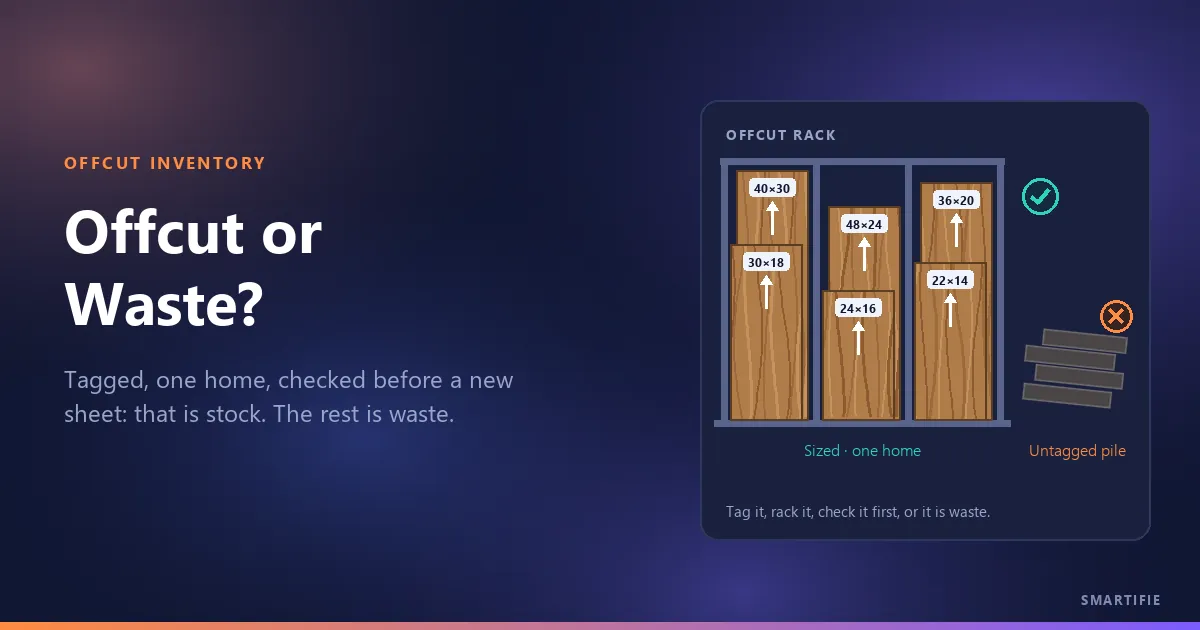
When is an offcut inventory, and when is it waste on hold?
Sitting on a rack does not make an offcut inventory. For it to count, three things have to be true:
- Its size is written on it: nobody has to walk over with a tape to know what it is.
- It has one home: when someone looks for it, it is there, not spread across three corners of the shop.
- The next plan checks it first: before a new sheet is opened, someone checks whether anything on the rack will do.
If any one of the three is missing, the offcut is neither used nor thrown out: it takes up space, gets moved around and is thrown out in the end anyway. One practitioner, after clearing his rack, wrote that a $75 pile of wood had probably cost him three times as much in space and time (WOODWEB 2010). How offcuts enter the waste figure is a separate question; we covered whether offcuts count as waste in the article on waste percentage. This one is about running that test day to day in the shop.
Which offcuts are worth keeping: not the area, the part it can become
Keeping offcuts by size feels natural but misleads. The real question is “what can this become?” Your most frequent parts set the bar: drawer sides, toe kicks, rails, shelves, small doors; for extrusions, the length you cut most often. If an offcut does not cover any of those parts, however big it looks, it will most likely just sit there.
In a cabinetmakers' forum digest, the rules are built exactly that way, around the part (WOODWEB 2010). One shop sorts drops by size and grain: a piece at least 4 × 19 in with the right grain direction goes to the drawer-parts stack, one at least 5½ in wide cross grain goes to toe kicks, and anything smaller is thrown out. Another keeps only half sheets of common stock. On custom or laminated panels opinions split: one keeps them as the exception to the rule, another calls keeping leftovers from a special job, once it is paid for, a horrible practice.
The value of the material counts too. In another thread from the same knowledge base, one cabinetmaker says it pays to track expensive sheet goods, while tracking MDF, particleboard and melamine with the same effort may not be worth it (WOODWEB 2014). Roughly: track veneered, patterned or unusual-thickness panels closely; on plain white melamine, set the bar high and keep only the sizes you really cut often.
A practical way to see whether an offcut will earn its spot is to try your frequent parts on that size. In the free cut list optimizer, enter the offcut's size as the sheet size, add your frequent parts and see what comes out. If none of them fits, offcuts that size are not worth keeping; if they do, write that size down as your keep threshold.
Offcut labels: what goes on the tag?
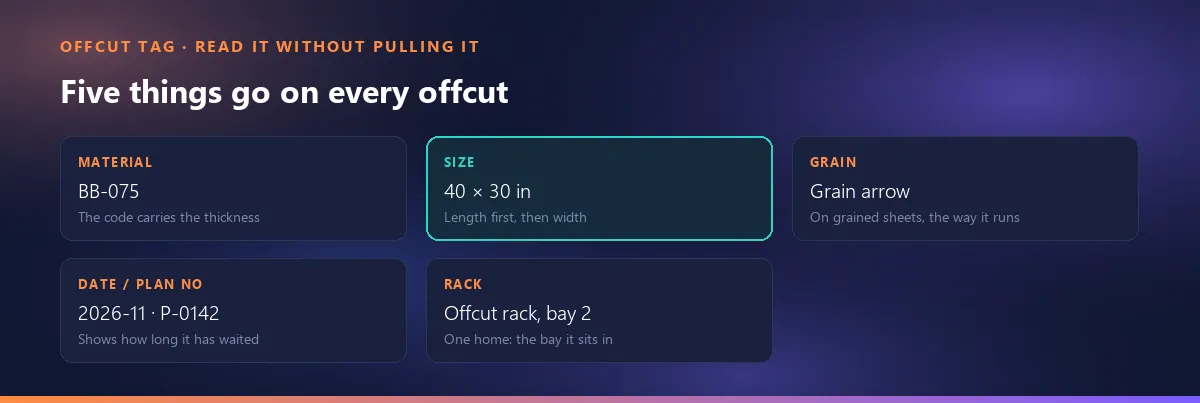
The tag has one job: to tell you what the offcut is without pulling it off the rack. Five things are enough:
- Material code, with the thickness in it (for example BB-075): two thicknesses of the same panel do not get mixed up.
- Size, length × width: make it clear which edge is the length, and enter it on the list in the same order.
- Grain arrow: on patterned or veneered panels, the way the grain runs. The arrow tells you which parts the offcut can serve; which parts have to follow the grain is covered in our grain article.
- Date or plan number: shows how long the offcut has been waiting; your clean-out rule relies on it.
- Rack or bay: the offcut's one home.
Write the tag on a visible edge or face of the sheet, where it can be read without pulling it out; on a vertical rack, the top edge or the front corner works well. One cabinetmaker marks his drops exactly this way: they go into his cutting software with their size, grain and a bin number, and the bin number and size are written on the drop itself (WOODWEB 2013). Part labels stuck on cut panels are a different topic; this is only about the offcut's own tag.
Where offcuts live: one rack, sorted by material and thickness
An offcut that lives “everywhere” lives nowhere. A pile in the corner, a few pieces behind the saw, a pallet in the back: an offcut with three homes gets searched for three times and usually not found. The rule is one home: a rack that holds sheets on edge, with bays by material and thickness, ideally near the saw. Standing up, the tags can be read; the bays keep each material together.
The rack needs a limit, too. The rule practitioners mention most is a fixed space for offcuts. One cabinetmaker splits his cutoffs into two piles by size, each with a border; when a pile goes past it, he tosses pieces until it fits again. Another uses racks with fixed spaces: “if the space is full, it is scrap” (WOODWEB 2010). Give the bays names (Offcut rack, bay 2, or A-3) and put that name on the tag. The logic behind giving every bin an address in a warehouse works here too, just on a much smaller scale.
Use offcuts first: the rule and what it costs
The rule is simple: before a new sheet is opened, someone checks the rack, and the parts that can come out of an offcut are cut from the offcut first. One cabinetmaker keeps “use off-cuts first, even if cost is higher” switched on in his cutting software and cuts the offcut layouts first, so “the pile stays small” (WOODWEB 2013). He also has an exception: if the job takes the same number of sheets with or without offcuts, he uses standard sheets.
The rule has a cost, and practitioners are the ones saying so. Using offcuts takes time: walking to the rack, finding the right piece, cutting a separate layout. In one thread a cabinetmaker admits “sometimes we spend more time than its worth on it”; another asks whether managing offcuts saves enough to justify disrupting the flow of work (WOODWEB 2014). So the decision comes down to one question: is using the offcut cheaper than the sheet it replaces? On expensive material and frequent parts, usually yes; on cheap material and one-off small parts, usually no. Your sheet price and your shop rate give the answer.
Why the offcut list drifts from the rack, and how to keep them in step
Shops that keep an offcut list all run into the same failure. In one cabinetmaker's words, the offcut manager “is great until a guy in the shop uses one of the scraps and you don't know it” (WOODWEB 2014). An offcut on the list but not on the rack is a plan built on a sheet that does not exist; one on the rack but not on the list never gets used.
Three habits keep the list and the rack in step:
- Check the rack before you optimize. One cabinetmaker makes a list of the materials right before he optimizes; someone in the shop writes down the offcut sizes on hand or ticks them off a printed offcut list (WOODWEB 2014).
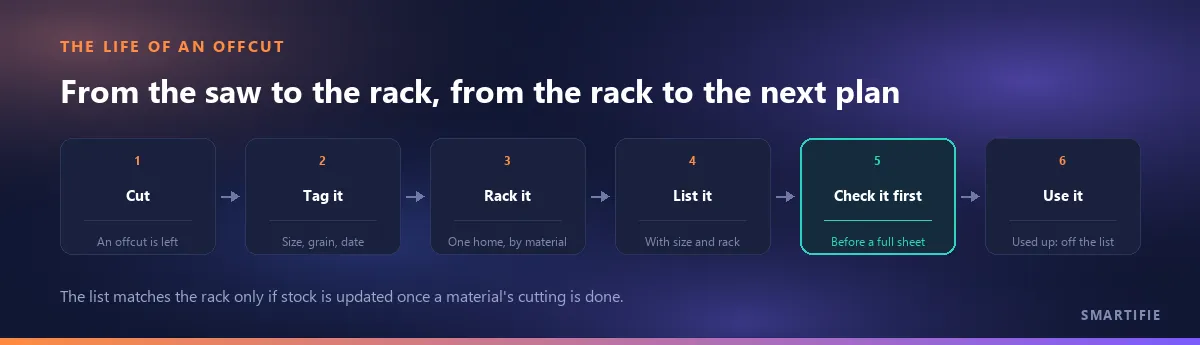
- Update stock when a material is finished, not while it is being cut. As another cabinetmaker puts it: do not adjust while still cutting that material (WOODWEB 2013). A half-done update means an offcut counted twice or not at all.
- Count at set intervals. In one practitioner's view, a periodic system with a physical count each month suits a cabinet shop better than trying to record every movement as it happens (WOODWEB 2006). For the offcut rack, comparing it with the list once a month is a good place to start.
The cabinetmaker who updates stock after cutting also adds a warning: you can easily get too detailed with this and spend more time than it is worth (WOODWEB 2013). The goal is a list that says the same thing as the rack, not a record of every scrap.
When to toss offcuts: a clean-out rule
You need a rule for throwing offcuts out as much as one for keeping them; otherwise the rack fills up and the good offcuts disappear under the bad ones. Three practical rules stand out in the same forum digest (WOODWEB 2010):
- Whatever has not been used for a set time goes. For one cabinetmaker that is 12 months; another keeps only offcuts he can reuse within 30 days.
- Whatever gets moved twice goes. If you have had to move a pile a second time, nobody is using it.
- Whatever overflows its space goes. If the bay is full, the oldest offcut makes room for the new one.
Those numbers are examples from the source, not our recommendation; pick your own period and let the date on the tag do the work. Tossing is not the only option either: offcuts you will not use can go to a school shop or a community workshop, or be given away as firewood.
Offcuts in a cutting planner: on the same list as full sheets, marked
Everything so far can be done with a notebook and a pencil. What software adds is tying the rack and the plan to the same list. In Smartifie Cut, a cutting planner that keeps offcuts in the same stock as full sheets, an offcut is a stock item with its own size: it sits on the same list as the full sheets and is ticked as an “Offcut”. You write its rack in the Notes field and, on a grained material, choose which way the grain runs on it (Along the length or Along the width). Leave the part code blank and the item is named from the material code and the size (BB-075 40x30, for example). Quantity is a whole number: part of a sheet is not half a sheet, it is a separate offcut row with its own size.
When you optimize, offcuts are tried before a full sheet; a full sheet is opened only when no offcut can hold anything. When a plan is sent to cutting (with the default settings), the sheets it uses come off stock, and the leftovers above the material's minimum reusable offcut come back into stock by themselves as offcut rows: they carry the grain direction of the sheet they were cut from, and their code comes from the plan number. Their rack is up to you; these rows arrive with empty notes. A used-up offcut drops off the list, while a full-sheet row stays and shows up under the “Only out of stock” filter, so you can see what to reorder. You can import your full-sheet list from Excel; importing the same file again updates the rows instead of duplicating them. Import is for full sizes; the offcut mark is set on screen. The details are in the guide's section on the Stock screen.
There is one thing the software cannot do: it does not see the rack. If someone uses an offcut without recording it, the list is wrong again; checking the rack before you optimize is still your job.
You can watch, step by step, how full sheets, bars and the offcuts already on your rack go into one stock list in Smartifie Cut in the video below. The materials, codes and values in it are fictional example data for a sample shop.
Watch how it works
Real screens, start to finish.

Cut List Optimizer Stock: Sheets, Bars and Offcuts | Smartifie Cut
How to enter your cutting stock in Smartifie Cut: full sheets with their size, whole-sheet quantity, cost and grain direction, bars by length under the supplier's code, and the reusable offcuts already on your rack, in one stock list.
The video loads from YouTube when you press play.
A six-point checklist for the offcut rack:
- Does every offcut carry its material code, size, grain arrow, date and rack?
- Do the offcuts have one home, and does the oldest one go when the space is full?
- Does someone check the rack and the list before a new sheet is opened?
- Is stock updated once a material's cutting is finished?
- Is the rack compared with the list once a month?
- Do offcuts past your own time limit get cleared out?
In short: choose offcuts by the part they can become, write the size on them, give them one rack and check them before a full sheet on the next plan; without those four, what you are keeping is not inventory, it is waste on hold.
If you want to try a cutting plan that keeps offcuts on the same list as full sheets on your own jobs, you can try Smartifie Cut free for 15 days, no credit card required. It runs as an app on Windows and Android, and in the browser on iPhone and Mac.